
How To Change Your Starlink Service Plan
Starlink allows customers to change their service plan type, from Roam to Residential, for example. I show you how in this guide.

- Author
- Published
- Community
- 75 comments
Starlink has been offering satellite internet service since late 2020. In that time, they've introduced several types of new service plans. Originally, it was just Residential. But now, in addition to Residential, Starlink offers Business, Roam (formerly RV), and Maritime.
Sometimes our circumstances change. Maybe you originally ordered Roam for traveling, and now you want to use it at home. Luckily, Starlink makes it very easy to convert from one plan to another. You can change from Roam to Residential, Residential to Maritime, and so on.
In this guide, I am going to walk you through the steps to change your Starlink service plan. I'll show you the process, explain some of the limitations, and answer commonly asked questions.
Video Tutorial
Step 1: Log in to your account dashboard
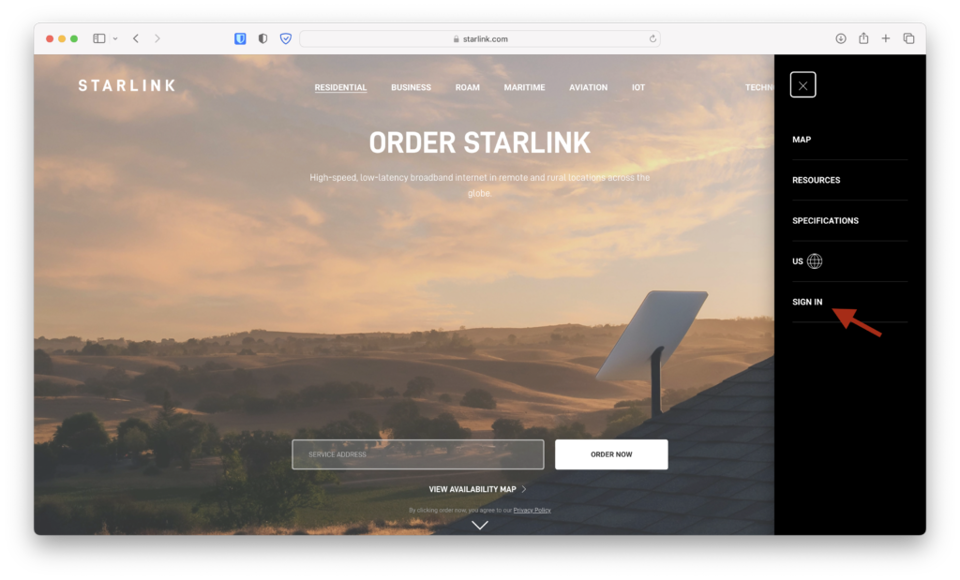
To convert your Starlink service from one plan to another, visit the Starlink website. Open the menu and select Sign In. Enter your Starlink account credentials. If successful, you will be redirected to the account dashboard.
If you are already signed in, open the menu and click My Account to proceed to the account dashboard.
Step 2: Click the Manage button on your Starlink

On your Starlink account dashboard, find the Manage button next to the service that you would like to convert. This allows you to manage account settings such as service address, service type, add-ons, etc.
Step 3: Click on Change Service Plan
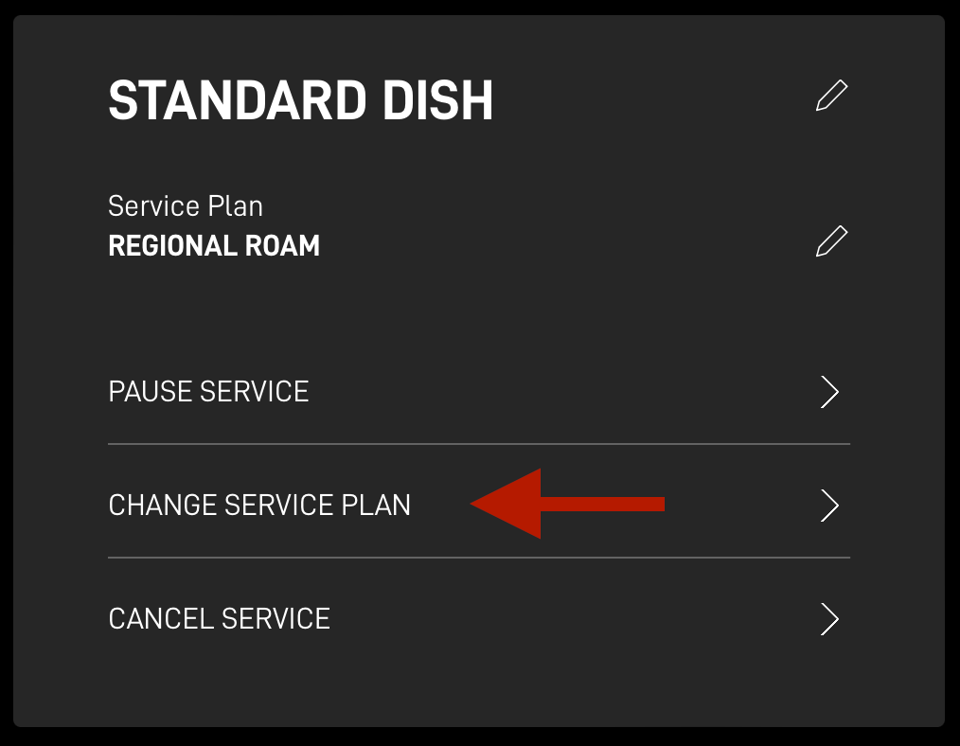
Click Change Service Plan in the menu to access the options you have for converting from one plan to another. You can also hit the edit icon next to the service plan.
Step 4: Select a new service plan type
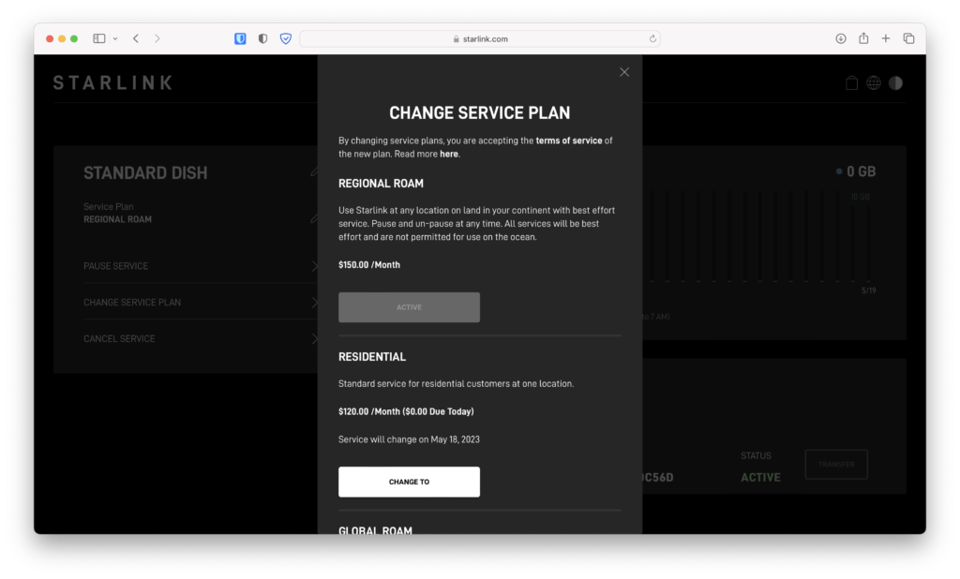
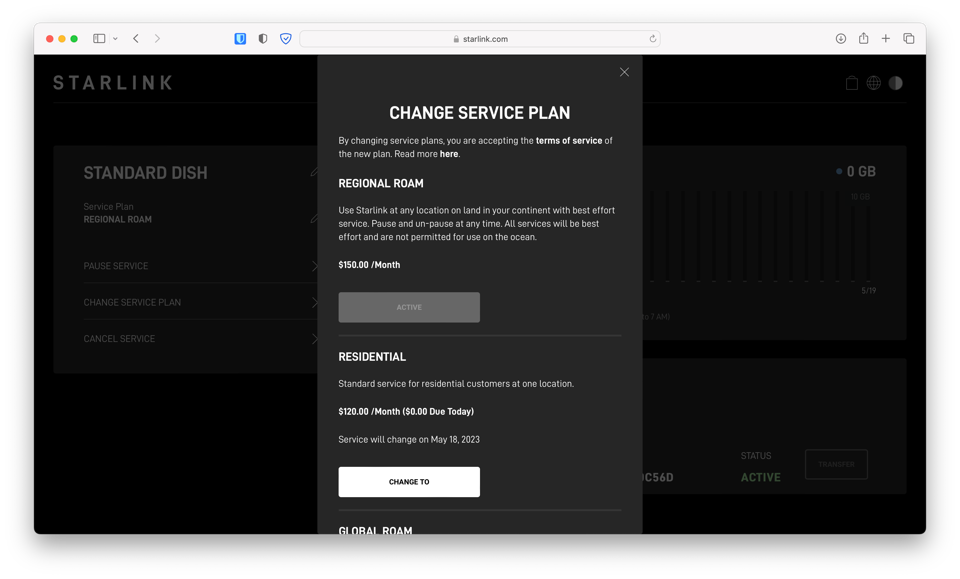
You have the option to change to various service plans: Regional Roam, Residential, Global Roam, and Maritime. To change your plan, click the Change To button of your desired plan.
The change will take effect based on which plan you are coming from:
If the plan you select costs more than your current plan (Residential to Regional Roam, for example), the change will take place immediately. The additional plan cost will be pro-rated based on how many days are left in your billing cycle.
If you are selecting a plan that costs less than your current plan (Roam to Residential, for example), the change will take effect at the start of your new billing cycle. You will be charged the new amount at that time. Your current service will continue until the new billing cycle begins.
Frequently Asked Questions
The process of changing plans is fairly simple, but I've compiled some common questions below. If you have further questions or concerns, please comment below or contact us.
Can I change from Roam to Residential in a waitlisted area?
No, Starlink will check your dish GPS location for Residential availability. If you attempt to convert to Residential in a location that is at capacity, you will get an error message. Converting to Residential from Roam only works in areas with open availability.
When converting Roam to Residential, what will my service address be?
Roam accounts don't have a service address, so when you convert to Residential, one will need to be assigned. Starlink uses the GPS coordinates to assign a service address, which can always be updated later on in your account dashboard. I highly recommend having your Starlink dish powered on at your desired service address before initiating a service plan change to Residential.
Are all service plans available?
No, not all of Starlink's plans are available in the Change Service Type menu. For example, if you have a Roam account, you can't change to Business. Which plans are available depends on your current plan type, and your country.
Why isn't the change from Roam to Residential immediate?
When changing from a higher cost plan to a lower cost one, the new plan will start on your next billing cycle. So if you currently have Roam (formerly RV) and want to convert to Residential, you'll have to wait until your current billing cycle ends. Starlink will provide the date that your new plan will begin.
Can I ever switch back?
Yes, you can switch back to any of the plan options presented on the Change Service Plan screen. For example, if you want to change from Residential to Roam for a few months, and then back to Residential, just follow the same steps at that time.
How much will it cost to convert?
It depends on which plan you are moving to, and what plan you currently have. If you are going from a lower cost to a higher cost, you'll pay a pro-rated amount for the new plan, based on how many days are left in your billing cycle.
If you are going from a higher cost to a lower cost, you won't pay anything immediately. Instead, you'll be charged the new monthly price when the new plan takes affect at the start of the new billing cycle.
Can you sell and transfer after converting?
Starlink hardware is not locked to the service plan types. In other words, if you converted your plan to Roam and then sold the dish to someone, the buyer can activate it on any plan type they wish. Residential availability depends on the capacity at the buyers address.
For more detail on the process, check out our guide on How to Sell a Starlink Kit.

Discussion
75 Comments