All posts

How to Buy or Sell a Used Starlink Kit

In this guide, learn how to safely buy or sell a used Starlink dish. I cover the entire transfer process, and answer common concerns.

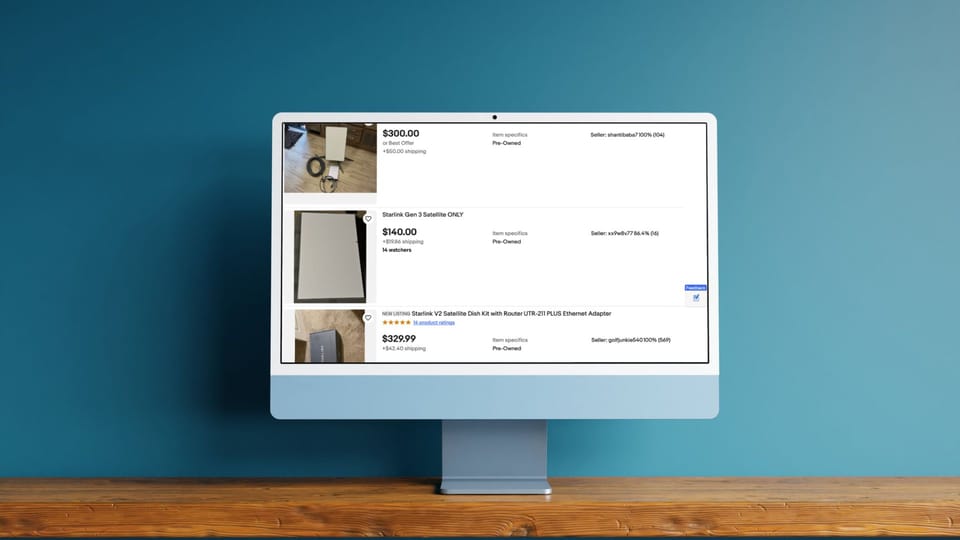
Browsing used Starlink listings on eBay

One of the most common questions I get from readers is about transferring a used kit to another person. The typical scenario is this: A Starlink customer is getting fiber or moving, and they want to sell their Starlink kit on eBay or Facebook Marketplace. Similarly, people are seeing used Starlink's online, and wondering if it's possible to buy secondhand.

If that sounds like your situation, I wrote this guide to address all of your concerns. I'll walk you through the transfer process, and give you some tips to make the transaction as smooth as possible. By the end, you'll have a complete understanding of buying and selling a used Starlink.

How to sell a Starlink dish

I've sold several Starlink dishes over the years, so I've been through this process many times myself. I typically list my old Starlink kits on eBay. It's been a smooth and easy process every time. Here is what you need to do to sell a used dish:

  1. Write down your Starlink's serial number

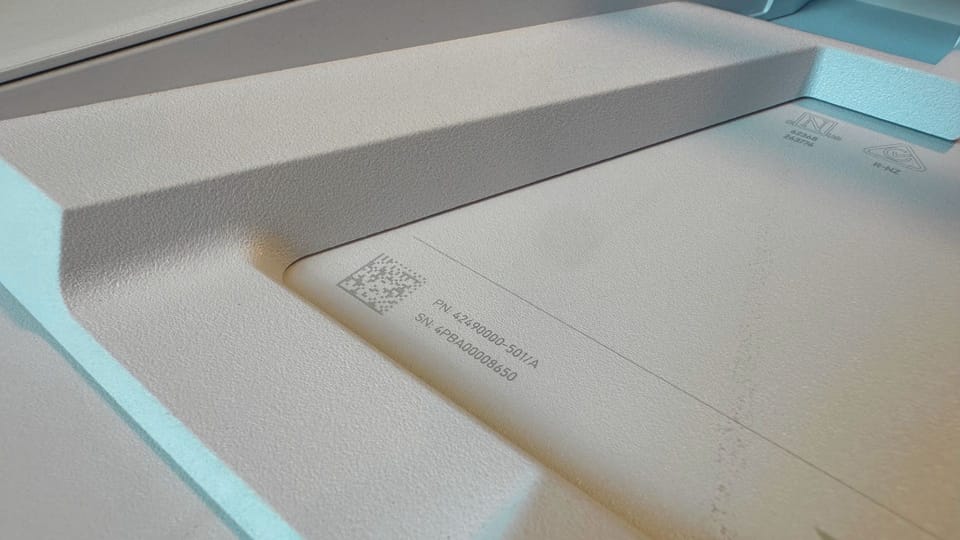
    The person you sell your Starlink to will need the serial number to activate the dish on their own account. Record the serial number or KIT# from your dish. The serial number is printed on the bottom of your Starlink. You can also use the KIT# from the original box. The KIT# is also shown on your Starlink.com account dashboard.Serial number printed on the bottom of a Gen 3 dish

  2. Cancel your service

    Your subscription must be cancelled in order to complete the transfer process. In order to cancel, all your outstanding orders and monthly statements must be paid in full.

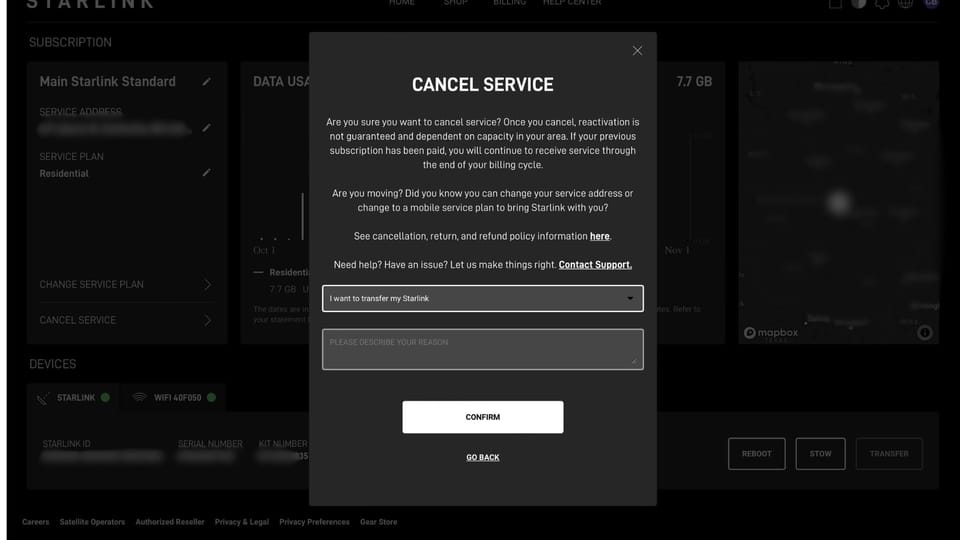
    To cancel your service, log in to your Starlink.com Account Portal. Click on Manage next to the service you wish to cancel. Then click Cancel Service in the menu on the left. Select the reason you are cancelling and type in a brief explanation. Click Confirm to process the cancellation.Starlink cancellation page
  3. Transfer the Starlink out of your account

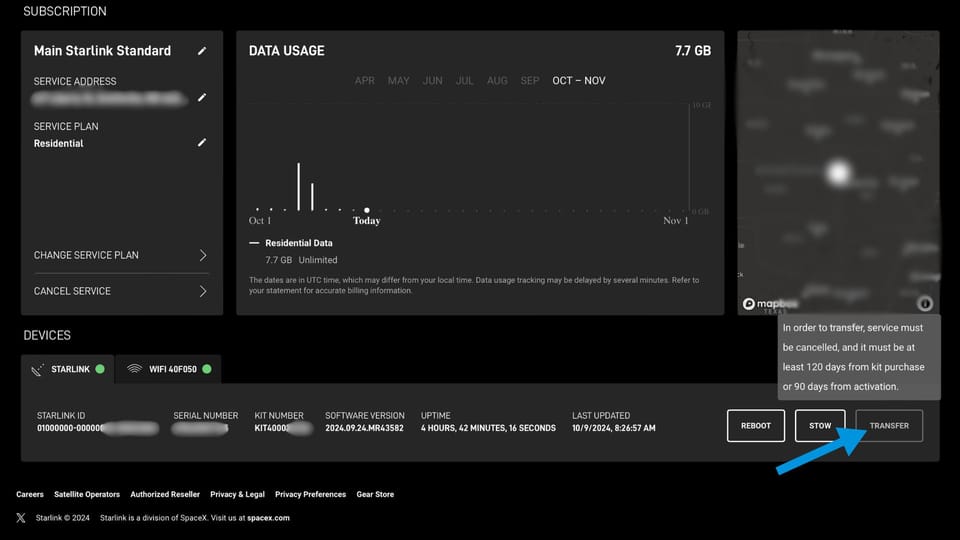
    Back on your account portal, click Manage on the dish that you wish to transfer. Then click Transfer. You'll need to confirm that you accept the conditions of the transfer. You have the option to send the buyer an email about activating the kit. If you don't have a buyer yet, you can skip this and just hit Close to finish.

    The hardware will be removed from your account permanently, there is no going back after you hit Confirm. Your service will stop immediately, and any remaining days in the billing cycle will be lost.Transfer button on Starlink account home
  4. Pack up the Starlink kit

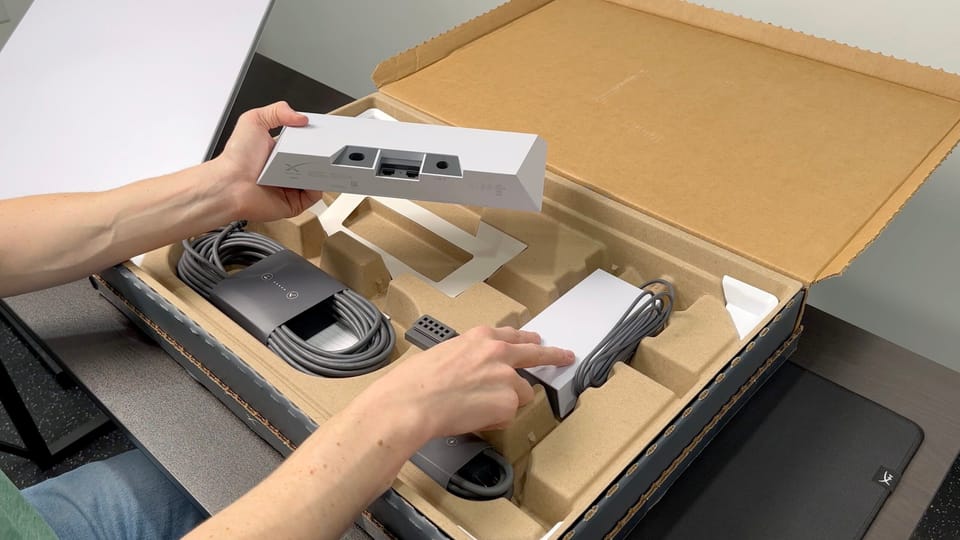
    Pack up all the hardware from your Starlink kit, preferably in the original box if you still have it. The buyer will need the dish, mount, Starlink cable, router, and anything else that came with your dish.

    Factory reset the Starlink router and any mesh nodes that you might be including. Refer to my tutorial on How to Factory Reset the Starlink Router if you need more info.Unboxing the Starlink Standard kit
  5. Communicate with the buyer

    When you find a buyer for your Starlink kit, you need to let them know how to activate the hardware on a new or existing Starlink account.

    Provide the buyer with the dish serial number or KIT# from step 1. Let the buyer know that they must sign up for service on Starlink.com/activate using the provided serial number or KIT#.

Selling tips and notes

Here are several things I've learned after selling several Starlink kits online. Follow these tips to ensure a smooth transaction:

  • Don't give the buyer the dish serial number or KIT# until you have received payment for your kit. Think of this number like the title of a vehicle. Only sign it over after the deal is done.
  • You won't be able to transfer a kit out of your account for at least 90 days from the initial activation, or 120 days after purchase, whichever comes first. If you just purchased your Starlink, you might have to wait to sell it.
  • Don't ever give out your Starlink account information or login credentials. To sell a Starlink you have to transfer the equipment, not the account.
  • Share this guide with the buyer so that you are both on the same page when it comes to the transfer process.

How to buy a used Starlink dish

Buying a secondhand Starlink kit is a great way to save some money vs buying new. Assuming the kit is in working order, a used Starlink should provide years of reliable service. Here is the process of buying a used Starlink:

  1. Get the Starlink dish serial number
    You'll need the serial number printed on the bottom of the dish to be able to activate the equipment and get service. The KIT# will also work.
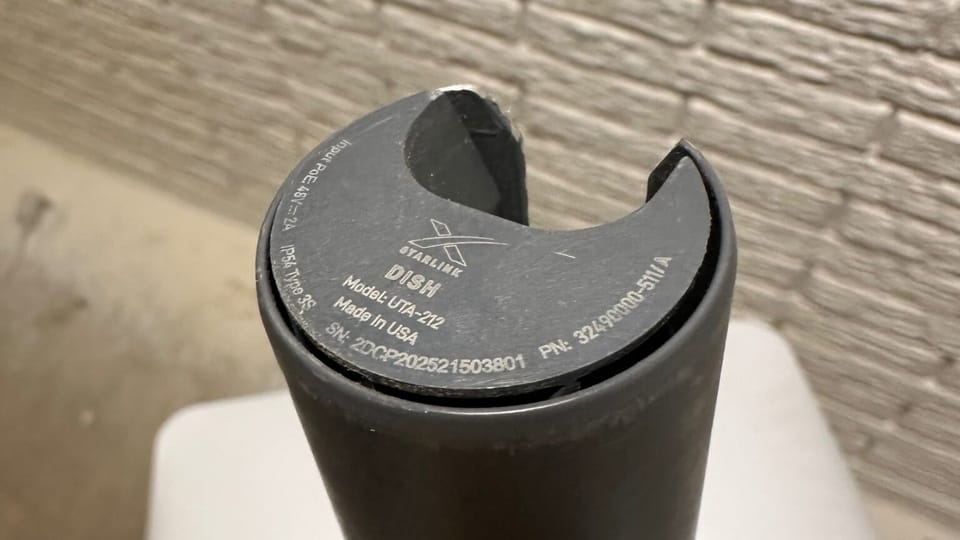
Starlink dish serial number printed on mast
  1. Activate the dish on a Starlink subscription
    Visit Starlink.com/activate and enter the serial number or KIT# provided by the seller. If you already have a Starlink account you can add a subscription by clicking Existing Account. If you are a new Starlink customer, click New Account.
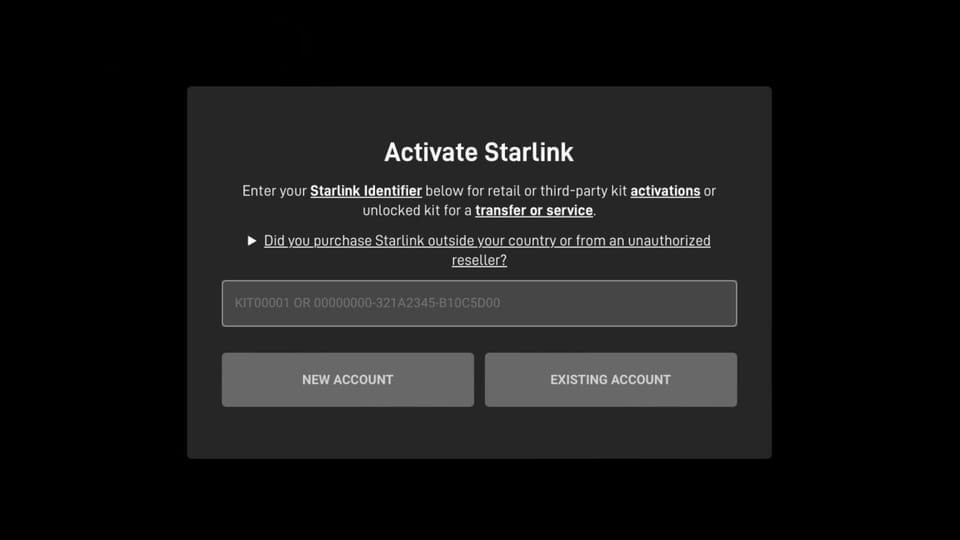
Starlink activation page
  1. Choose a service plan and complete the order
    Enter your address to see all the service plans available in your area. Select the service plan you want to subscribe to and click Continue to Checkout.

    Complete the rest of the order form, filling out your contact and payment information. You'll pay for the first month of your subscription at the time of the order. Click Place Order to finalize the transfer process.

Tips for buying used

Here are a few tips to keep in mind when trying to buy a used Starlink kit:

  • You won't be able to activate a dish that is already assigned to another Starlink account. The seller has to transfer the dish out of their account and provide you with the correct serial number or KIT#.
  • Communicate with the buyer before making any payments to make sure they understand the transfer process. Send them the link to this guide so you are both on the same page.
  • Check the Starlink website in advance to make sure the service you want is available in your area. You can check your address at Starlink.com to view plan pricing and availability.

Frequently asked questions

I'm getting the error, "This Starlink has not been on its subscription long enough to be eligible for transfer."

Starlink requires that your subscription be active for at least 90 days before your kit is eligible to be transferred. You will not be able to buy a Starlink kit and immediately resell it to someone else. You need to wait 90 days from the activation date, or 120 days from the purchase date, whichever occurs first.

I'm getting an error message about my Starlink identifier

If you are trying to activate service and the Starlink website isn't accepting your Starlink identifier, it could be caused by several things. Make sure you are using the right Starlink identifier. You can use the KIT# or the dish serial number. Make sure to communicate with the buyer to make sure you received the right number.

If you are getting the message that the Starlink is already associated with an account, make sure the seller has followed the steps to cancel and transfer the hardware out of their account.

Starlink scams and theft are becoming more common. If you've tried everything, and still can't get the website to accept your Starlink identifier, it is possible that you bought a stolen or currently activated dish that the seller wasn't authorized to transfer.

Can I cancel or reverse a transfer?

If you are the seller, you cannot reverse a transfer. Once the buyer has activated the equipment, you can't add it back. If the deal falls through before the buyer activates the dish, you can still sell it to someone else.

If you are the buyer and have activated used hardware with a new account, you can simply cancel the service. If you wish to return the equipment to the seller, or sell it someone else, follow the instructions to sell a used kit. Keep in mind, you'll need to wait 90 days from the initial activation before you can transfer the dish.

Does the warranty transfer over?

Yes. The warranty provided by Starlink starts from the date of the original purchase of the equipment. Any remaining warranty time is transferred with the equipment, to the new owner. In the US, the warranty for the Standard hardware kit is 12 months.

Can I transfer a Starlink kit to a different country?

Generally, yes. Starlink charges a fee called the "Outside Region Fee" for activations of equipment that didn't originate in the same country. The fee ranges from $200-$300 depending on the country.
Discussion

255 Comments

  1. Carla Hemmings
    After buying the Starlink system, my email address has changed. How do I get this info to Starlink as I don't see it on their website?
  2. Terrance Walling
    Under the “How to buy a used Starlink”section, Step 3, it should be the seller that submits the ticket to Starlink.
    1. Noah Clarke
      Thank you for catching my mistake, the typo is fixed.
  3. Rob
    The seller has a new dish he is currently using. He is going to give me the old dish. Would the old dish have a separate closed account? It would be a deal killer if he must transfer his new active account. Thanks
    1. Noah Clarke
      It depends on how the seller purchased the new dish. It's possible to have multiple locations/plans on one Starlink account. The seller will just need to reach out to Starlink and see the best way to proceed with the transfer.
  4. jasmine chatelain
    Used Starlink unit
  5. jasmine chatelain
    oops . . .thanks so much for this info. Can you pls clarify what you mean when you say Starlink service needs to be available - the buyer needs to be eligible? My area says waitlist.
    1. Noah Clarke
      As a buyer, your address needs to be eligible for Starlink service. If your address is on the waitlist, you wouldn't be able to have another Starlink account transferred to your address. In other words, if you can't buy a new Residential dish and service for your address, you won't be able to buy used either.
  6. Ramona Moyer
    How do you get to the ticket you have to fill out to transfer, I get to customer support it says go to the app I go to the app and it tells me again go to the app
  7. Melissa B.
    I bought a starlink kit that has never been used. The seller states that no service or account as been established. How do I proceed to establish an account?
    1. Noah Clarke
      They had to have created an account to order it. They will need to use their account to contact Starlink in order to transfer the account to your email.
  8. Cindy
    I am moving into a new house that has established Starlink service. How do I get it transferred out of the seller's name amd into mine?
    1. Noah Clarke
      You can send this article to the seller. They will need to follow steps above. Basically, they need to submit a support ticket to Starlink telling them they want to transfer service to your address and email.
  9. Elloise
    My partner just bought a new starlink kit from someone who received 2 kits by accident. Starlink is available at our address but the wait time to receive a kit is over a year so this seemed like a simple solution. Is it possible to create a new account without going through the entire ordering process? Obviously the seller is going to keep their account and I can't find any information on what to do in a situation like this.
    1. Noah Clarke
      The seller will have to reach out to Starlink to transfer the dish. The seller will send Starlink your address and email, and Starlink will create a new account for you. It all has to be done through the seller because they have access to the Starlink ticket system.
  10. jabapoo
    so apparently as of 0810 2022 Starlink is no longer doing transfers of service on circular dish- Bloody hell as i had this sold and 4 people wanted it .. i even contacted starlink last week to advise the date of transfer to happen in which they told me we could not transfer service in advance and to wait until aug 10th when i could disconnect and do transfer to recontact them and now they are saying NO and refusing to do it.
    1. Noah Clarke
      Thanks for the information. This is the first I've heard of not being able to transfer the round dish. Would you be able to send me a screenshot of the support chat/email indicating they are not able to transfer the round dish? If it's available please send a copy to admin@starlinkhardware.com
    2. Dave F
      Hi. Did you receive confirmation that this is true?
    3. Noah Clarke
      It doesn't appear to be a new policy. There seems to be a few misinformed customer service agents at Starlink. I had originally added a disclaimer to this article but I have since removed it because it doesn't appear that they are stopping all transfers of the round dishes. Several people in the US have told me they were able to transfer the round dish in the last week or so.
  11. Rod
    Have you ever heard of a dish not being updatable? I was told by a seller that starlink told him, his sis is too old to update? He wants to sell it to us, and from the little I’ve found on the matter, it is very much updatable, it just takes time? Could you verify thh HH is please.
    1. Noah Clarke
      I've heard conflicting reports on fixing the issue. A Starlink dish can fall too far behind on firmware, essentially bricking it. But I've heard that: Plugging the dish in, and just leaving it for days and days will eventually get it updated and working again For some people, it never updates, and Starlink tells them they need to pay for a new dish to get service again
  12. Sam
    Fiber internet was recently installed in our house, so I need to close down my Starlink Rectangular dish/router with a Residential account. If I choose to deactivate my account without transferring my service, could I sell my used dish/router ‘as is’ later on? Could a buyer get a new Starlink Residential account that would work with my used hardware (without buying a new dish/router)? Nice website, great information!
    1. Noah Clarke
      Yes, you are able to transfer a deactivated account later on if you wish.
  13. Mark S.
    Frustrating that the RV unit can't simply be converted to a Residential service as I bought RV a few months ago expecting a longer wait for Residential. Residential was available now but I had to purchase a second kit at $599 to set up the non-throttled service at home. Now I have a spare kit that I *might* use remotely a few times a year but would rather not need to purchase a second kit.
    1. York
      I'm in the exact same position. I got the RV unit in August, as they said the Residential service would not be available in my location until 2023 (which I interpreted as maybe 2023 / maybe 2024 - you know how Elon is with hyping aggressive timeline targets..... :-) Anyway, just got the mail that my residential service is available. I then logged a support ticket and asked to convert my RV to Residential - becuase I didn't do my research. Starlink support has not responded to my ticket, but re-sent the mail that my Residential service is available and extended the timeline for me to accept. Oh, and my bandwidth on my RV service just dropped dramatically. Coincidence? I'm now buying the Residential kit.......
  14. TJ Heitstuman
    I was awarded my starlink in a divorce but have no login or password information do to it being in her name. All I have is the account info. She cancelled service and I have a different internet provider. I have people interested in getting starlink and buying my equipment. How can I transfer the account
    1. Noah Clarke
      You can visit the website www.Starlink.com and hit Log In from the menu. From there, click on Forgot Password. You'll have the option to recover the account via alternate email if you have the account# and related info. Once you have a new email set up, you can start the transfer process by following the steps in this guide.
  15. Brandon Fernald
    Wanted to add a slight twist to the transfer process that I'm in the process of attempting to resolve. I purchased a dish on ebay. I followed the steps laid out above, filled out the account transfers form, received confirmation from Starlink that an account had been opened, logged in and set up the password, etc. With that done, I made payment to seller, and have now received the dish. When to hook everything up, and everything works, with the exception that it doesn't come online and has a GPS not in service location error. Checking the FAQs, I'm directed to "Manage Locations" to ascertain what the location address is. This is when I realize that I have no locations in the account settings. While Starlink authorized the opening of a new account for the service address I provided and started billing me 110/mo, I guess they forgot about transferring the actual dish to my account. Service request pending...
    1. Noah Clarke
      On your account on the website, does it show a map? Should be able to update the service address yourself from the account dashboard.
    2. Brandon Fernald
      Apparently, you cannot activate the dish outside of the service location. Not being able to activate it, meant it didn't show up on the location/manage screen in the dashboard, which meant you couldn't add portability. After going back and forth with account support, they finally added the dish to the location page, which allowed me to add portability. Then, unplugging the router and rebooting everything got me online.
    3. Noah Clarke
      Excellent, thanks for the follow up. Glad they got it working for you.
  16. Brandon Nelson
    Do Starlink Business dishes also transfer/sell on the secondary markiet? Can I also ask: Can I just put a residential dish on top of my small business building, for roughly 1/5th the price? Thank you!
    1. Noah Clarke
      Yes, Business hardware can be transferred as well. It's more rare to find them on the used market, though. Yes, you could use the Residential service for a business, but technically that would be breaking Starlink's terms of service.
  17. Craig
    We sell A LOT of connectivity devises in the RV market to OEMs and through distribution. Who can we contact to become a Starlink reseller in the RV market.
    1. Noah Clarke
      From what I understand, Starlink wants to avoid resellers. Your best bet to contact them would be to buy one and use the account to create a support ticket asking to get in touch with someone who can help you.
  18. M.Huisman
    Hallo ik ga verhuizen naar Spanje en wil mijn Starlink schotel daar ook gebruiken wat moet ik doen ? ik verkoop hem niet dus wat is de overdracht naar Spanje ?
    1. Noah Clarke
      You can update your service location by visiting the Starlink website and logging in to your account dashboard.  Google translate: U kunt uw servicelocatie bijwerken door naar de Starlink-website te gaan en in te loggen op uw accountdashboard.
  19. eric
    I have a business starlink I am willing to sell. Used it for four months no issues.
  20. Jon
    Pretty clear you can't sell and transfer from a RV account but how about buying from a standard account in to be used as an RV account?
    1. Noah Clarke
      Yep you can convert Residential to RV, so you would follow this process, and then convert your account to RV afterwards.
    2. A Smith
      In order to buy a residential dish (to be converted to RV), would I have to start with transferring to an address with availability first and then changing to RV? Or - can I buy a residential dish and have it transferred to me as an RV? (only RV available in my area)
    3. Noah Clarke
      It's unknown how the new transfer system will work in February, so it's hard to say. But previously, you would have to transfer Residential to an address with availability, and then convert to RV.
  21. Landon
    I have a Gen1 round dish kit that I’ve used for a year. Portability has now been introduced. If I added portability to my existing account and was able to get a second gen1 dish could I mount the second dish at my cabin (which is now in an area that has service) and simply move my original power supply and modem back and forth to whichever location I’d be at? This way I’d have one account with the portability option and be able to take it with me and use it at the location I’d be at. Does anyone know if this would work, will my gen1 modem work on another gen1 dish?
    1. Noah Clarke
      Router should work fine on both dish's, but I'm a little confused on why you would want two of them if you have Portability enabled. The whole point is to be able to take the dish with you to a secondary location. If you had two dish's, you wouldn't need Portability, since you would have one at each location already. The Portability applies to the dish, not the router.
    2. Landon
      Hi Noah, thanks for your response. Allow me to further explain. I have a cabin in a very remote part of Alaska, l just was notified that my Starlink order for there could now be fulfilled. This got me thinking with the recent addition of portability could I more fully utilize my existing system that I already have. Transporting the gen1 dish itself back and forth between Alaska and Wisconsin each time would be a logistical problem. If I could pick up another used gen1 and just use the dish itself, bring that out once and leave it permanently mounted at the cabin and still have my original dish at my home would it work? That way it would be much easier to carry just my original power supply and modem back and forth and just be able to plug in when I got there. I tried Starlink support but I’m not confident they fully understood what I wanted to do. They advised that it first must be a gen1 to be compatible. That I understand, but then they said it would need to be registered and have it’s own account. But that’s why I’m intrigued by portability, I don’t really want or need two systems, not if I can use the one I have and take it with each time I go. I just wanted to alleviate having to haul the actual dish back and forth each time on a floatplane. Thanks for any advice you can provide. L
    3. Noah Clarke
      From what you described, I think you need to purchase Starlink RV for the used gen1 dish you purchase. That way you could pause the subscription when you aren't using it. You can't have two dishes on one account. In order to not be transporting a single dish back and forth, you would need two separate lines of service. Portability just gives you the option of using the dish in a secondary location. Not useful unless you plan to actually move the dish back and forth. You can either buy Starlink RV new, or buy a used dish and convert the account to RV later.
  22. David VanGelder
    Can I buy a used dish, yes it's available for my location, sign up as a residential customer, then convert to the RV/portable account so I can take it on the road? I'm looking for a used dish for my RV.
    1. Noah Clarke
      Yes, you can convert from Residential to RV after the account migration is complete. It cannot be converted back to Residential, though.
  23. Kody jay
    I have bought a used starlink kit and it has arrived and is working The seller sent my information to star link for transfer But it has been 8 days with no word from star link on my end
    1. Noah Clarke
      The seller should have sent Starlink your email, and Starlink should reach out to you to confirm the sellers account #. I would give it a few more days, and then have the seller contact Starlink again. Make sure to check your junk email folders, and make sure the seller has your correct email.
    2. Kody jay
      I had the seller send another request in a few days ago I have checking all my junk and spam folders From what I've heard from others they never get the email
    3. Kody jay
      Is there a chance that they won't even be able to transfer the service over I've read quite a few forums of people buying them on ebay and they just wind up being paper weights I know service is available in my location cause my neighbors use star link for their internet But I have yet to get any type of response from starlink on the transfer
    4. Jon
      Just had a successful transfer of a Gen 1 kit purchased on Ebay. Took a day or two for Starlink to respond and another day for it to be finalized. Initial transfer questions from Starlink included one on RV service which was selected but ignored. Once finalized bill came in at $110 and account had to be changed to RV.
    5. Kody jay
      Well I have been waiting 10 days as of now Thats when they sent the first transfer request, and another one 3 days ago
  24. Carter Calle
    Hi there! I’m confused by one part of this process. I am currently on the waitlist for service in an area where many of my neighbors have service. Can an account be transferred to me if I am on the waitlist? If not, why would it matter whether the email I provide was already in use for a Starlink pre-order account? Also, I could buy an RV account for my address on the Starlink site today. Is there any downside to buying an RV account instead of waiting for a regular account? Thanks!
    1. Noah Clarke
      Technically, no, you can't have service transferred to an address that is waitlisted. But I've heard many reports of Starlink failing to check, and approving the transfer anyway. Worth a shot, in my opinion. For the email issue, Starlink will create a brand new account during the transfer process. So you can't use the same email that you pre-ordered with. RV has several downsides, but is a viable option if the used dish doesn't work: https://www.starlinkhardware.com/starlink-rv-vs-starlink-residential/
    2. Carter Calle
      I’m going to give it a shot. :-) Thank you for being so helpful!
    3. Carter Calle
      Well, Starlink denied the transfer since I am on the waitlist. Do you know if it’s possible to activate the used equipment I bought as an RV account but remain on the waitlist with a different email address for a residential account? Thanks!
  25. Darcy
    We bought a house and the seller left the unit there for us! our seller set up the information and contacted starlink to transfer the unit to us. Unfortunately it took weeks for the seller to get us his account number and the service was cancelled (the old homeowner gave us his user name and PW!) after finally receiving the account number, AND FILLING OUT THE TRANSFER FORM, I have heard NOTHING in return from starlink! NOTHING! I was very happy with the service that we had for the short time! I am very unhappy with the customer service or lack there of.
    1. Noah Clarke
      I would use the account the seller gave you credentials for, and submit another support ticket, asking to reactivate the service or transfer the service. Basically, start the process over again.
    2. Billy
      My router is not working. Can I buy a mesh router someone is not using and attach it to my dish?
    3. Noah Clarke
      Yes the mesh router will work just fine as a replacement. Just be sure to do a factory reset on the router by unplugging and plugging in the power 3x in a row.
  26. Kody jay
    Its been 3 weeks since I bought my dish off ebay The seller put in a transfer request twice and I've still yet to hear word on the transfer The seller has stopped contact with me and What do I do now?
    1. Noah Clarke
      It sounds like your address isn't available for transfer, and the seller doesn't want the dish back. Go through eBay and start the return/refund process, citing the unsuccessful transfer and seller communication as the issue.
  27. Stefon
    If I buy a used system from private party and use their dish only to replace my damaged dish will my account remain intact? Or must I use the Sellers equipment and reactivate their account?
    1. Noah Clarke
      The dish is tied to the account, so you would probably need to transfer their account to your name to use the dish. You might try contacting Starlink directly to see if they could swap out equipment on your existing account, though. Worth a shot!
  28. yeppers
    I bought a system from landlord, was working great until transfer request. I have submitted this twice now with no response from star link. When i look up the address it says it is on a wait list but we already had the service there it just needed to be in my name. Well since the transfer request I have no service. Do we know how long this takes to transfer so I can pay and get services in order to have any working services in my home as I live in a rural area.
    1. Noah Clarke
      So the landlord gave you the account login info for you to contact Starlink? If you submitted the request, you should have received an email from Starlink on your own email to set up a new account.
  29. mike
    As you indicate the RV "option"(?) is not a robust as the residential option. Is it possible to switch options from residential to RV for the RV season and then back again when I return to my residence?
    1. Noah Clarke
      I don't know what you mean by robust, it's the same hardware. You can switch from Residential to RV, but not back to Residential. If you just need to travel with Starlink for a few trips a year, consider keeping Residential and just adding on the Portability feature.
  30. Melanie L
    We have an RV hardware package but are done traveling (located in BC, Canada). We will not need this equipment in the future. Do we have any options for selling or getting anything out of our equipment? Or is it just an expensive paperweight now if the RV system cannot be transferred?
    1. Noah Clarke
      Right now there are no options to transfer RV service. Starlink has temporarily stopped doing service transfers until their new self-service transfer system is in place at the end of the month. You'll have to check back then to see if they start allowing RV to be sold/transferred. Make sure you subscribe to our email newsletter. I'll send out an updated transfer guide when the new system is live.
  31. Terry Richard
    We bought a house with Starlink and I purchased equipment from seller. I received transfer email on January 3rd and filled out form. Today my internet went out so I called seller and now his account is inactive and I have no service. I never received another email from Starlink since January 3rd….what do I do?
  32. Paul Landry
    Hello, Thanks for the informative site.... Looking to get a Starling for rv standard for my cottage in Canada. I live in Norway and am planning a trip oner in the spring. To insure the starlink is there before me, I am planning to have it shipped to a neighbour so it is there when we arrive. My question is (can't find anything on starlink;s site) the 30 day return option starts when you log on with the starlink or when it is delivered?
    1. Noah Clarke
      The 30 day return window starts when it has been delivered.
  33. Samantha Gonzales
    Im so mad i am trying to get a ticket for Starlink but i do not have the options for the thumbs up or down.
    1. Noah Clarke
      You have to be logged in to the Starlink app or the Starlink website to see the thumbs up/down. If you are on the app and already logged in, try to log out and then back in again.
  34. Mitch Ashley
    Where can I get a second starlink "dish only" so I can leave my RV setup in my RV and just move my starlink modem in my house and connect to the secondary dish when I'm home at my registered address?
    1. Noah Clarke
      You can't because the service is tied to the dish itself, not the router.
  35. Bohdan
    I wanted to transfer my Starlink to another country. And can do it only as RV. But actually I dont need RV. Need a common Residential but in another place. Whats the catch? What this transfer feature for if I just could buy a portablility ?
    1. Noah Clarke
      Did Starlink support say you could only do it as RV? If you haven't already, I would create a ticket to ask about this situation. They might have more options. The catch with RV is that it's a bit slower at times because RV users are deprioritized on the Starlink network. But otherwise, it would work fine if there isn't Residential availability in the place you are moving.
  36. Mitch
    Can Starlink for RV be paused? If so for how long and how many times a year? I understand that one account cant have two dishes on it, correct? So to use portability you would lose Starlink at the home, So best to get Starlink for RV on same or new account with a seperate dish?
    1. Noah Clarke
      Yes, RV can be paused for however long and as many times as you need. It's done in monthly increments, based on your billing cycle, so you'll pay for full months of service and it cannot be prorated when you pause again. Correct, you can't have two dishes on one service plan. So if you did Portability with Residential, you would have to take down the dish if you wanted to travel. RV would be your best bet, added to your existing or new account, if you want to have a separate travel dish.
    2. Doug
      I upgraded from standard to HP, and have swapped the two. Accommodation was conveyed regarding return shipment via USPS, by phone, but the lengthy transfer of FedEx via mail to this region somehow allowed the support ticket to be closed before the HP arrival, and the ticket would not allow reopening. Both setups show active, but I thought of transferring the standard to someone local. Perhaps the new "transfer" mode has shuffled the deck some. When I hover the cursor over "transfer", it indicates service cancellation required, but the service cancellation option does not designate any specifics, either/or of hardware, and "service" makes me think "account". Most, with just one kit, are likely closing that account, but I am not. Especially after your warning about no going back. I had reopened a new support ticket, copy/pasting the original, seeking advice. But they are so swamped, and this transfer roll-out is likely still being sorted out. Appreciate all the patient tolerance you've shown. Have you encountered and previous dual active systems within the login manage page? Hope I'm making sense here
    3. Noah Clarke
      So when you upgrade or replace a dish, both will be active in your account for a period of time. After you have started using your new hardware, the previous hardware will be removed from your account automatically. This can take several weeks. Record the Kit # from the old hardware, and check back in a couple weeks to see if it has been removed from your account. What I'm not 100% on is if this old hardware is truly unlocked. You can verify by attempting to activate an RV account following the process in this guide. If it accepts the Kit # and is only going to charge you $150/month, then you'll be able to sell it and transfer to someone else. If it gives you an error, this hardware may no longer be valid in the Starlink system and is essentially useless.
    4. Doug
      Good advice, patience. Since northern Alaska availability we've seen some recognition by Starlink that time delay in shipping and shipment modes very much scramble defaults. My original order took 6 weeks to be transferred from FedEx to US mail, then arrive. Billing starts 2 weeks after orders ship. Problem returns, time allowed is expired before arrival. But the operating functionality is such a game changer that the frustration is worth the gamble. And, through months of dialogue, latent as heck, some support folks realized the need to flex and accommodate the regions circumstance. Speaks well of the organization, while they are swamped. I eventually received a return shipping label, adjusted to USPS, since we have no FedEx. After being scanned locally, as enroute/returning, I received full refund for the original standard dish. That patience part is critical and necessary, since support is so overloaded. Appears they have a long memory. Transferring could have saved the slow shipping delays involved, but the two processes, upgrade/transfer, may have conflicted. Appreciate the feedback, I was tempted to force things.
  37. Desiree F
    Hello, I’m buying a house with Starlink already hooked up. I’m purchasing the equipment from the previous owners for the same address. Is there a way to just continue the service? Can I call and speak to someone on the phone?
    1. Noah Clarke
      If you don't mind the previous owners name on the account, you could just take over their account. Change the email, phone, and credit card of course. No, there is no phone # to call. You could request that Starlink call you by submitting a support ticket through the Account Portal.
  38. Kateryna
    Hi, thanks for such a useful info. Unfortunately I have a problem from the beginning. I don’t have a “cancel service” button on my account. Not on the first page, not going to “my starlinks” - “manage”.. (as you advise) there is no one. I use Residential now. Do you know maybe they change its location. I already tried to write to support, but they don’t answer.
    1. Noah Clarke
      It should be on the left hand menu after you hit Manage. If you don't see it, make sure you are logged into the correct account. Then contact support if it is still not there.
  39. Lisa
    After a seller completes the transfer how long does it take for the equipment to be available for the buyer to set up?
    1. Noah Clarke
      It is available immediately after the seller transfers the equipment out of the account.
  40. Alex
    Why should I pay full equipment price to Starlink during activation of the transferred device? Maybe somebody knows - what I'm doing wrong?
    1. Noah Clarke
      Just start typing your contact and payment info, it should update to just the monthly price.
  41. Jamie Finnen-Gratzer
    Hi! We just purchased a home in Bimini Bahamas. There are people there that have Starlink, but when we go to the Starlink site, I believe it shows it’s not available. What do we put in as our service address so that we can get a dish ordered?
    1. Noah Clarke
      They might have RV, you should be able to order that.
  42. Kara
    Hi. I want to buy a used Starlink from a friend and give it as a gift to someone. My friend has not used his Starlink for the past 4 months and the dish has a slight dent on it. So I want to test the dish before wrapping up the kit as a gift. Would it be possible to pay the monthly payment to Starlink and test the dish for a few minutes only and cancel the subscription? Would Starlink refund the money back to me?