
My Review Of Starlink After 4 Years: The Good, The Bad, Is It Worth It?
I’ve been using Starlink satellite internet for 4 years. In this long term review, I share the good, the bad, and what I’ve learned along the way.

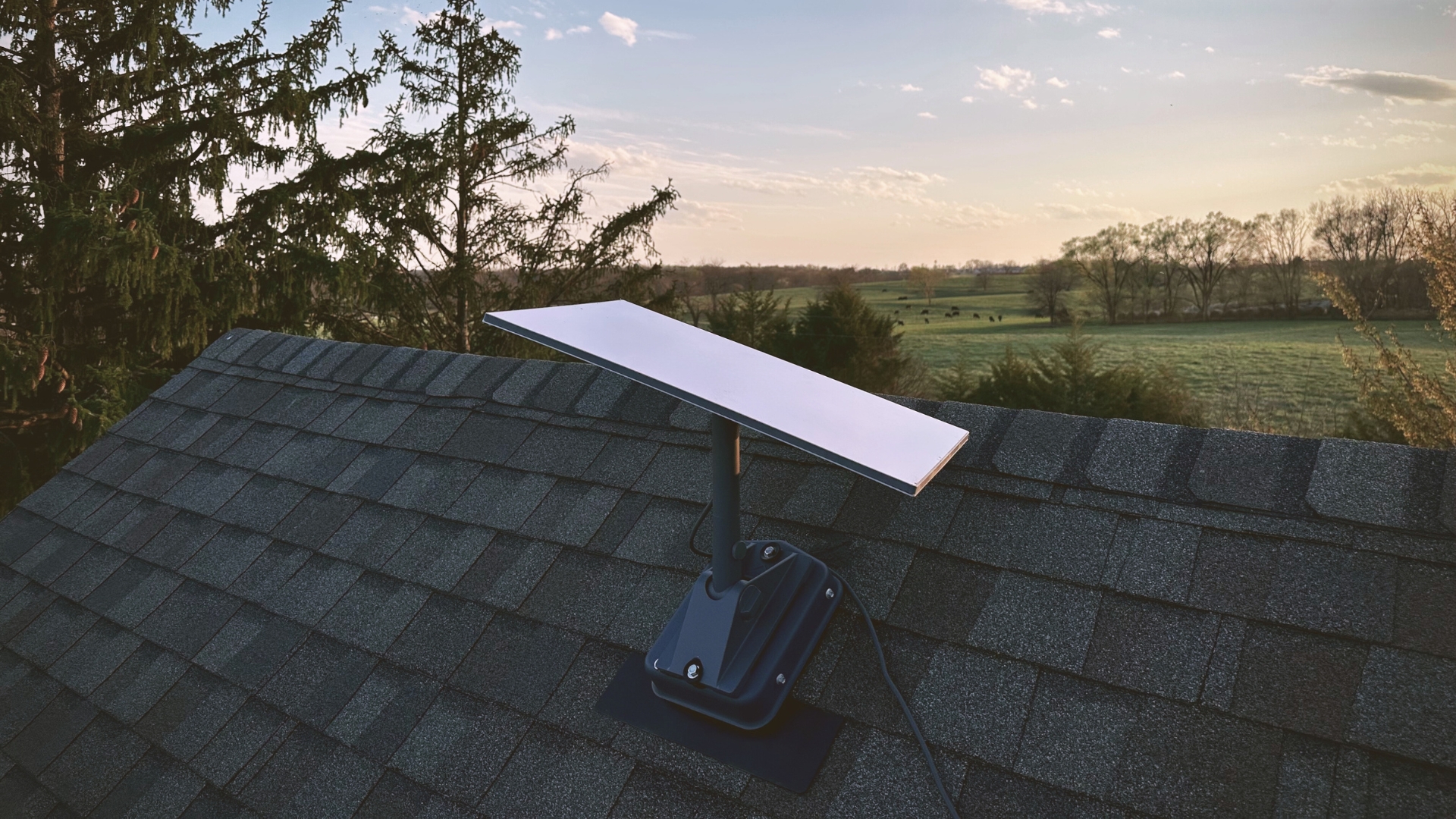
I just hit my four year anniversary of using Starlink satellite internet. Although I’ve posted over a hundred times about Starlink on this blog, I’ve never done a review of the service itself. In this post I’m going to fix that, giving you my long term review of the good, the bad, and whether or not Starlink is still worth all these years later.
If you’re interested in Starlink and want to hear from a long-time customer, this post is for you. I’ve broken down this review into good things and bad things, with a summary at the end.
Coverage
The best thing about Starlink, by far, is the coverage. It’s available virtually anywhere in the world, as long as you have a clear view of the sky. At the time of this post, Starlink operates in over 130 countries. Their constellation of over 7,000 satellites provides global coverage, allowing people in rural and remote areas to finally have access to high-speed internet.
I moved into my current home in 2018. There was no cable or fiber internet available on my street. The small town I live in has around 10,000 people, and I’m technically in city limits. But according to all the local internet provides, there were no plans to expand services to my address anytime soon. I was stuck with DSL which maxed out at 5 Mbps down, and 1 Mbps up.
I signed up for Starlink in early 2021, right after they started their public beta program. It was a complete game changer. I finally got access to high-speed internet, allowing me to do things like stream on multiple devices and download large files. I could finally experience modern internet, without being held back by my slow DSL connection.
These days, with Starlink, no property is too remote, no area too rural. You can now get high-speed, low latency internet just about anywhere.
Contracts and Commitments
Another great thing about Starlink is that they don’t have any contracts or commitments. Before getting Starlink I was looking into Viasat and HughesNet. I read the horror stories about trying to cancel and get out of the two year contracts without paying hundreds of dollars.
Starlink is completely different than most ISP’s. They are very upfront and transparent about their pricing. You pay for the equipment, which you then own outright. You also pay each month for the service, which you are free to cancel without fees at any time.
I pay $120/month for the “Residential” plan, which is their home internet service. $120 is the exact amount that I get charged every month. There are no hidden taxes, fees, or extra charges on my bill. If I want to cancel my service, I can do so anytime I want, with no fees. I can even sell my equipment to someone else to recoup some of the cost.
Speeds
Performance is another area where Starlink shines, especially compared to legacy satellite internet providers like HughesNet and Viasat. Specifically, download speeds and latency are impressive. I ran a speed test before I started typing this review, see the performance for yourself:
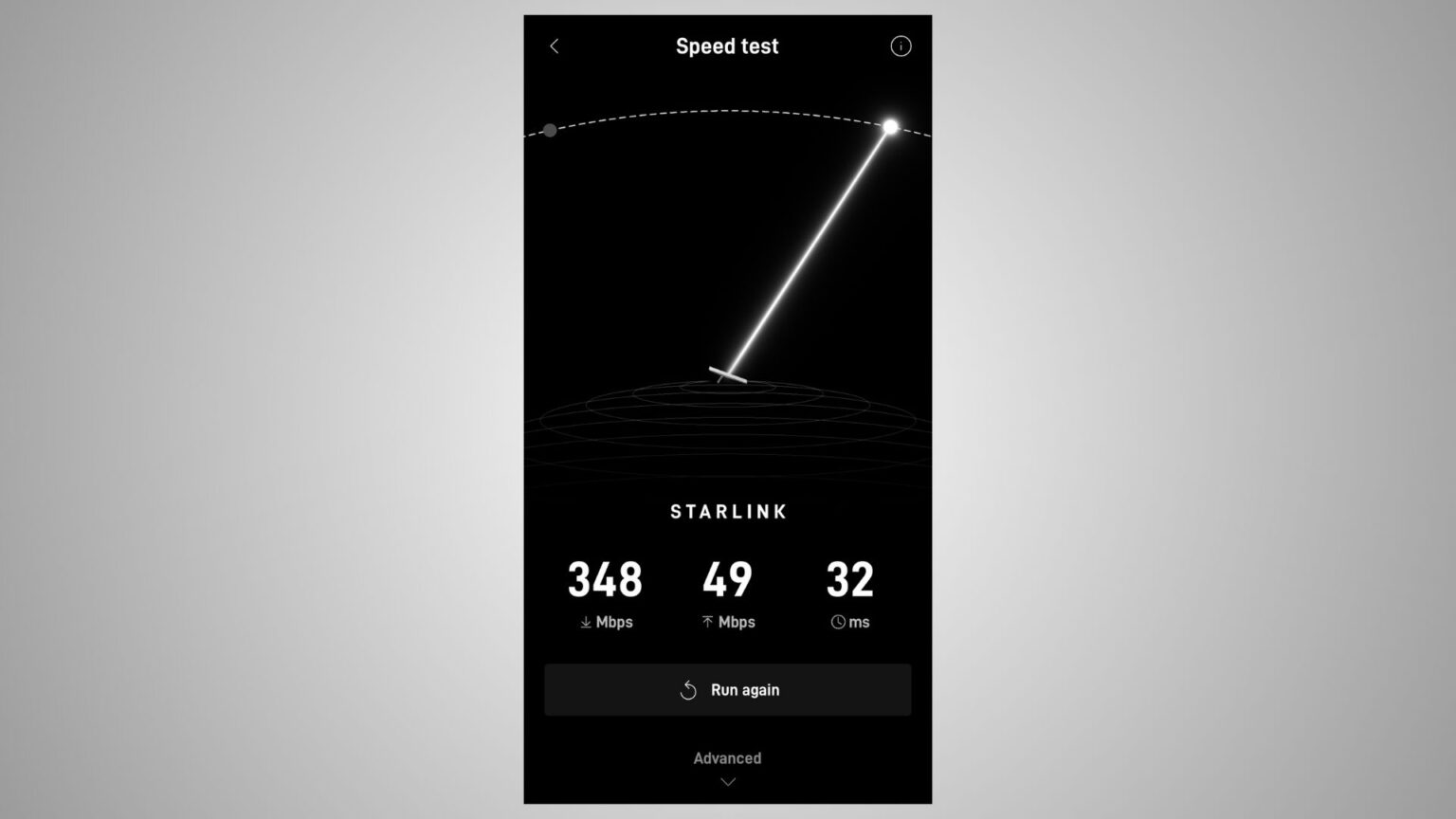
I routinely get over 300 Mbps download speeds, and usually between 20-30 Mbps for upload speeds. Latency is the biggest advantage over other satellite internet providers, though. Starlink satellites are in low Earth orbit (LEO), allowing for latency that is more like fiber rather than satellite internet. With latency, lower is better, and I typically get between 20-30 ms. With other satellite providers, latency is between 600-700 ms, which can cause issues with online gaming and video calls.
The high speeds and low latency of Starlink allows me to do things like online gaming, video conferencing, and of course, uploading content to the DISHYtech YouTube channel!
Speeds are one thing that I’ve noticed change over time. As the satellite constellation grows and technology improves, so does performance. When I first got Starlink I was lucky to get 100 Mbps down. But in the last couple years I regularly see 300 Mbps or more. Starlink continues to focus on performance, so it’s basically guaranteed that your speeds will just keep going up as time goes on.
Reliability
Surprisingly, reliability is another advantage of Starlink. When most people think of satellite services, they think of Dish Network or DirecTV, where storms, rain, and snow would cause a lot of signal interruptions. Starlink is completely different. The active phased array antenna isn’t affected by wind, clouds, or most kinds of weather.
Heavy rain and snow can cause short interruptions, but I’ve only had issues a handful of times in my four years of using Starlink. It handles most storms with ease. The Starlink antenna can even melt snow and ice to prevent it from accumulating.
The equipment has been rock solid for me. I’ve never had a failure or technical issue with my Starlink dish or any of the associated hardware. My original round Starlink dish from the beta program still works great, although I don’t use it for home internet anymore. I upgrade with every new model so I can create content for the blog and YouTube channel, but all of the 7+ Starlink’s I’ve purchased continue to work great without any issues.
Data Caps and Throttling
Another good thing about Starlink, especially compared to other satellite internet providers, is that there are no data caps or speed throttling. The $120/month Residential plan that I have comes with unlimited data, and I don’t worry about my speeds being throttled. I typically use around 1TB of data each month, and have never seen my speeds reduced as a result of my fairly normal monthly data usage.
Even the travel internet plan, Starlink Roam, has unlimited data. Starlink does offer plans with data caps, like Roam 50GB or their business internet plans, but everything is very transparent. In the case of Roam 50GB, the data cap is right in the name!
For the average home internet customer, Starlink’s Residential service plan has no data limit, you are free to enjoy truly unlimited data. This is a stark difference between other rural internet options, which typically have restrictive data caps that limit the amount of things you can do online.
Gaming
Online gaming is the final item on my list of good things to say about Starlink. Again, like reliability, this one might surprise you. Satellite internet, historically, hasn’t been very friendly with online gaming. But Starlink is different, with its low latency and high speeds.
I play games like Rocket League and iRacing, which are fast-paced. Any lag or high ping is noticeable, and creates a significant disadvantage in the game. My average ping time to game servers is usually below 50 ms. In general, any connection below 100 ms will be fine, so Starlink is well within the requirements of most online games.
Like I mentioned earlier with speeds, online gaming is something that Starlink has dramatically improved over time. In the early beta days of Starlink, online gaming was a challenge. They didn’t have as many satellites or ground stations as they do now. Latency was still fairly good, but there were lots of short interruptions that caused some lag. These days, however, gaming is great on Starlink. The only time I have issues is during heavy precipitation, where the signal can drop out for a few moments, causing a bit of lag.
Customer Service
Nothing is perfect, and that includes Starlink. I’ve listed my top good things, but now it’s time for some of the bad things I’ve noticed over the last several years.
Customer service definitely has to be the biggest downside of Starlink. If you’ve read other reviews, or hung out in any of the online Starlink communities, you’ve seen the horror stories. Starlink doesn’t have a phone number or email. You can’t just contact them to ask simple questions. All communication goes through an online ticket system.
When you do submit a ticket, it can take days, even a week or more in some cases, for someone from Starlink to get back to you. As you can imagine, this is a huge problem if your internet goes down and you are stuck without service.
Have questions for Starlink about the plans or equipment before buying? Too bad, they don’t have a sales team, call center, or even email support for non-customers. Although they do provide good documentation on their website, I wouldn’t consider that a replacement for good customer service.
To be fair, once you finally get a response from Starlink, they tend to go out of their way to make things right. If your service is down for several days, for example, Starlink has been known to issue service credits to compensate you for your trouble. A free month of service doesn’t get you back online faster, but it at least shows that Starlink wants to make their customers happy.
Personally, I’ve had pretty good experiences with Starlink customer support. Like I mentioned earlier, I haven’t had any hardware or technical issues. But I have sent in tickets to ask questions about billing and some other general topics. On average, I wait 2-3 days for a response, which isn’t a big deal for routine questions.
Cost
Another bad thing about Starlink is the high cost, at least compared to most other types of internet like fiber, cable, or 5G wireless. The tradeoff, of course, is the incredible coverage that Starlink has versus those other internet options. If you compare Starlink to other satellite internet providers, it’s much more competitive.
With Starlink you have two costs to think about. First is the equipment cost, which you must pay for upfront when you order. The Standard hardware kit that I currently have was $349. That’s a big chunk of money for most people. The second cost is the monthly service fee. The Residential plan costs $120/month.
Starlink has increased my monthly price two times in four years. When I first signed up for Starlink the monthly price was $99. A year or so later it was increased to $110. Another year after that it was bumped up to the current $120/month. Starlink is different from traditional ISP’s in a number of ways, but regular price hikes are one exception that you should be aware of.
On the flip side, the equipment costs have gone down dramatically. My first Starlink kit cost me $500. These days you can pick up the current generation dish for $349, even less in some areas that qualify for a hardware discount. Starlink is offering more and more discounts and promotions as they increase the efficiency of their antenna production. You can expect kit prices to continue to decrease as time goes on.
DIY Installation
Another downside to Starlink is that almost everything, from installation to troubleshooting, is do it yourself (DIY). When you order Starlink, it’s 100% on you to figure out how to get it installed properly. They won’t help you get in touch with an independent installer or anything like that. They do provide pretty good documentation and installation tutorials for their own mounting accessories, but it’s up to the customer to climb on the roof and actually do the work.
Not everyone has the physical ability to install Starlink, and not everyone who possesses the physical ability has the technical knowledge to complete the installation. Most Starlink’s will have to be installed on a roof, and it can be dangerous to climb up and get the job done.

Thankfully, 3rd party companies have stepped in lately. Many local businesses have popped up all across the country to provide Starlink installation services. You should be able to find someone by searching Google for a Starlink installer in your area. Hiring someone to install Starlink for you does increase the upfront cost significantly, but at least you have options if you can’t do it yourself.
If you do plan on installing Starlink yourself, be sure to check out my Tutorials. I’ve posted reviews and installation tutorials for all the common Starlink roof mounts.
Is Starlink Still Worth It?
Overall, I’ve really enjoyed using Starlink satellite internet for the past four years. And it looks like I will continue to be a Starlink customer for the foreseeable future. There are still no plans to install fiber down my road, so my internet options will continue to be limited.
The most important thing to me is performance. As I’ve covered in this review, Starlink is capable of incredible speeds and latency. It just keeps getting better and better. Although I wish it was more affordable, Starlink gives me all the performance I need right now, so I’m completely satisfied as a customer.
Most people considering Starlink simply don’t have the luxury of alternatives. Starlink might be the only high-speed internet option in many rural parts of the country. So if that’s your situation, where you don’t have fiber or cable internet to consider, Starlink is 100% worth it.
If you do have cable or fiber access, but maybe it’s not as fast or reliable as you hoped, Starlink is still worth looking into. Although the upfront and monthly cost will typically be higher, Starlink has proven to be very fast and reliable, at least in my case.
And if you currently have another satellite internet provider like HughesNet or Viasat, I definitely recommend trying Starlink. You’ll get better speeds, lower latency, and you won’t be locked into a commitment. Starlink offers a 30 day money back guarantee, so if it doesn’t work out for you, return it for a full refund.
Final Thoughts
Starlink has pros and cons just like any other internet service. The bottom line is that Starlink provides coverage where most other types of internet don’t. For me, it’s been worth dealing with the high cost and lack of customer service because Starlink is the fastest internet option I can get at my house. The advantages on this list far outweigh the downsides.
Update: Over a year has passed since I posted this review, and many things have changed. Check out my follow up Starlink review to hear how things are going in 2026.
Now I’d love to hear from you. What questions do you have about Starlink? If you are a current Starlink customer, what do you agree or disagree with on this list? Anything else, good or bad, that you would add?

I live in a rural part of missouri and am trying to figure out what internet service to get since fiber is not an option.
Your article is fantastic! Im going to give Starlink a go.
Thank You!
Thank you for the review. I plan on switching from Kinetic/Windstream. We have been a customer of theirs for 31 years. They are now charging ~180.00 at month for internet and a home phone. Ridiculous. I was hoping for SL’s $55 per month plan, but all I am being offered online is the $120 plan. I will try calling them and see what feedback I get.
Thanks again for the review
Bridget
Do you have to upgrade your equipment every few years in order to keep up with the speeds?
Direct contact. Do you have meetings outside? Video games outside. Storms, no customer service. Costs more. Going after customers which are. sparse. No way I would go with Starlink.
Thank you Colby. The info was very helpful. One question, they offer a residential price of $55 a month. What are the other fees that bring it up to $120?
We just ordered Starlink. My concern is that I work from home and you discussed outtages. What caused them?
I have just ordered Starlink 100 for my caravan set in rural Wales UK. WIFI is a joke here. What I really want to know is does the dish have to be mounted. Can I just have it on my decking area. Clear view of skies, no tree coverage. The kit only cost £19.99 for postage and £40 per month. (Around $55)
It doesn’t have to be permanently mounted. Just needs a clear view of the sky.
Hi Lynn
I am thinking about getting this for my Motorhome. Would you recommend it?
If I would change to the residual 200 instead of max, will my speeds and latency be about the same? Can you easily change back?
You can easily change back in the Starlink app. Latency should be identical in my experience. Speeds will be capped at 200 Mbps, so it depends on what you were getting with the Max plan as far as if they will be roughly the same. I will say most people have no need for anything above 100 Mbps unless you are downloading very large files regularly, or you have more than 3 devices streaming simultaneously.
We are snowbirds and spend time 6 months in each place. Obviously we can use wifi in only one place at a time. Could we use the “nomad” program and hook up the hardware for use in each place? Currently, our southern location does not have any space through the local provider. We only use the internet for streaming and computer use. No gaming. Your thoughts?
Is it two countries?
Hi, I have Xfinity Comcast and Xfinity Mobile service and we have 4 tvs and equipment for each. My bill runs at about $245/month. I live in a small town in the Stanislaus forest. I am 75, female with 1 other senior roommate and my son. I read your post in its entirety hoping the at Starlink was the solution to my high monthly bill. Although, apparently for various reasons the Staink is not for me. I found your article extremely informative and well written. Your pro and con section was understandable and detailed.
Good job on this article. C. Viloria
Thank you for the review it was helpful I’m going to go with starlink I’ve heard of them heard good things about them and I think I would be helping for our generations in the future colonizing Mars starlink is involved in that and that’s a great thing for humanity.
Just to let you know, as of today 3/8/26, my equipment would be no charge, $21.85 for shipping to Louisiana, and $50/month. A $99 install fee is an option if someone prefers. Support seems to be availale by phone.
How do very cloudy days affect the system? I live in hurricane prone areas and usually wet spring and summers…. TV Satellite systems wouldn’t work properly in moderate winds or really cloudy days. Curious the difference in Starlink and DishNetwork.
Thank you for your straightforward info and insight.
Colby,
We live in a very rural area in the middle of pastures. Our only option for internet right now is Windstream & they are unreliable and expensive ($110/month). I know zero about tech so my question for someone who has used it is this…we have cell phones, laptops, and streaming tv services (FUBO, Roku, etc.). Starlink will support all of this correct? We got a promotional flyer in the mail and are seriously considering changing over. I know it’s $10 more but for reliability it would be worth it. Thank you so much!
I’m fortunate enough to have Frontier fiber, mostly underground in my area. Even the least expensive bottom tier gets me 500 MBPS downloads. Ergo, fortunately, I have no need of Starlink, or even the highly touted Verizon 5G internet. Bottom line, for both speed and reliability, you just can’t beat wired instead of WiFi.
If wired isn’t an option, then what would you do?
Considering starlink because my cox fiber has become unreliable
I’ve heard that quite a bit with fiber. Starlink is definitely a good alternative if you can mount it with a clear view of the sky. You can download the app and check before ever purchasing Starlink. In many areas, the home internet service is only $80/month and free equipment. Good deal if you are sick of your fiber company.
I am about to move to a remote area that has only one fiber provider, but the fiber is not very good from what others have told me (buffers bad). My question with Starlink is, being in a remote area, will there be any issues with congestion? This village is 6 miles from the closest town, and the villages population is about 25 people. I need something is can stream tv and games reliably any time of day. Thanks.
We installed starlink v2 actuated at my sons garage over 3 years ago while they lived in the garage we built there forever home .so we installed 2 cat 6 cables to the house 125 feet away from the sl router and dishy.at the house we use a tp link axe 300 , we have never set the router to bypass and this 3rd party router works great as is ,I had my it son in law look into the double nat and he saw no issues with it both in router mode .so we left as is and operates great ups on both routers. So if there’s a d nat issue what would be the signs of problems ? Thanks kevin
Thank you for such a thorough review. I could not agree more with your assessments and comments. I am currently in a service ticket situation with a GEN2 setup, the WiFi portion of the GEN2 router is having issues. When I originally created a ticket AI Chatbot indicated a new router was needed, however, they couldn’t complete the order and I have now been waiting 3 days for assistance. Fortunately I have my workstation setup with an ethernet connection so I am not totally down. Coincidentally, Starlink offered the Mini-kit free of charge with a recurring monthly fee of $5.00 if not used and 50% off roam when in use, I did accept this offer after issues with the GEN2 router. At this point, I half expect a call or email from Starlink instructing me to upgrade to a GEN3 system, I truly hope they offer some type of incentive if that is the case.
What about TV service?
I have YouTube tv. Would I continue to pay YouTube?
I am curious does the starlink. Equipment have a external plug in to run a ethernet cable to another router as my main interest for this is to be able to install security cameras on my house and shop but shop is 100 yards away from house will it reach shop or can I run cable from house to shop to put another router in shop or will I have to buy 2 systems ?
Yes you can run another cable and get the mini router its cheaper and it should be good for cameras and your phone. Also they sell a 140 foot cable you could run condit under the ground and fish the cable through and you won’t even have to trip on it.
Good deal in the UK at present, no upfront cost for equipment and free installation, only cost is the monthly subscription (£75pcm)
Delivery and installation within 8 days from order and immediately have increased from 25mbps to over 250mbps
Great service experience so far
I was the last dialup customer in the county, Or so the ISP rep told me
About the same time, I put down my deposit and waited for a year.
Never look back, Poor neighbors hooked the hughes.
Sprint rep at the county fair said fiber is coming, In 1989.
Neighbor claims fiber is coming, 3 years ago. LOL
We are the phone company, and we don’t care.
I live in an area with several trees. When we did the test it said “frequent interruptions” several times. My roof area is wide open but there are trees close to the house. Would Starlink still work for us?
Thank you so much for the great information! I am ready to get starlink . I am on hughesnet right now that is THE WORST service ever! Viaset is awful to i changed from viaset to hughesnet and it got worse. As soon as my contract is over I’m ordering my equipment.!
To anybody looking for fast internet speeds to game with… PICK ANOTHER PROVIDER!!! The connection is unreliable and will drop when you need the internet to work the most. The only reason why I have it is because I live in Sicily in farmland where there are barely any hardline internet lines set up and I’m forced to use wireless means (Starlink, SIM Card Routers, Hotspots, etc.). I used to have one of those SIM Card routers that runs off of the cell towers to provide me internet but at night and on weekends, the traffic would get really congested and start to borderline become unreliable. The speed was also capped at 40mpbs max (even though it mostly sat at between 25-30), so gaming and downloading would take a hit. If Starlink is truly your only option, then by all means. It’s not a bad provider, just not good enough for gaming imo. But if there are other options, preferably hardline options, then go for that.
Like you said, the vast majority of people only use Starlink because they have to. No other options exist, so it’s impossible to pick another provider. There was a reason why the initial Starlink beta was officially called “Better Than Nothing Beta”.
My tech skills are severely limited. You’ve probably already answered my question, but I didn’t understand. Sorry. Anyway, we have two houses (miles apart) and an RV. Would I need to have 3 devices and 3 plans?
Thanks for your comments. They have been really useful. Cost of cable in our area is close to $200 a month for basic service, so the cost of SL is a savings for us. We are currently using Hughesnet, but AIY!!! The internet speed that they call high speed, is equivalent to the old dial up. Then, half-way thru the month, I get a message that says I’ve use up my data??!! It isn’t working for me.
Hello Carol, based on your description, you have two houses several miles apart. If there’s no visible obstruction between the two houses, I recommend using a wireless bridge to connect the two homes. This way, you only need one internet plan, saving money. I’d love to help!
Jason from China
Thank you for the review. I think we are going to try it in addition to our cable internet service. The Cons were not an issue for us as I already work with telemetry technology for a living, the cost is nominal as compared to upgrading an iPad or TV. The travel feature is also appealing as we spend time in the Rockies.
I have been trying to transfer my equipment to a family member in Western NC impacted by the hurricane. There is a small issue with the serial number that i need them to correct in their system so he can complete is account. I opened a ticket 6 days ago and a few more since then. I have been through their escalation process. Each day, I get a bot message that they are sorry they didn’t help me today and will reach out as soon as possible. REALLY 6 days? Reminder, you can file a complaint with the FCC regarding poor service. The Federal govt spent millions to upgrade internet service to rural areas and that hasn’t done much good. You would think that Starlink would be willing to help those in Western NC impacted by the hurricane. there is no cell phone service at their location nor internet. So sad that such a high tech company can’t make a good old fashion phone call.
Me I live in the middle of bum f**k nowhere we tried to get back on a good internet but our usual ISP we had in the big city is not available where we currently live,
Our only option is with one ISP hat has blazing fast speeds of 25Mb/s for the same cost of SL, I’ve used other starlink systems and set them up before (work locations in off grid areas) and back then it was working fine I ordered my own (12month promo to get the equipment for free) kit arrived in 3 days after ordering and setup naturally easy but the system stayed online for my home for only 8 hours, and the system failed I opened a ticket to see what’s going wrong with it and after exploring the app I found the debug menu where I took enough screenshots to prove to them that the kit I recieved was faulty and they are sending me a new one (ticket took about 36 hours to hear from support)
I like the idea of starlink I don’t like the cost But the speeds can’t be beat.
Few things I will add though is on the first system our app speed test was saying about 350-400Mb/s but a simple Xbox update for one game (5Gb update) was getting an average speed of 20Mb/s with high spots (10-15seconds) of 180Mb/s
How large of area does it cover? We have 10 acres. We want coverage for the house and a shop that is about 100 feet away. Is that doable?
The router advertises (gen 3) that it will get you a range of 3000sqft.
Furthest distance I personally seen was about 100-150 ft from the router
However hard wiring your system will prove to be beneficial.
You might get some signal in the shop, but it might be worth investing in an outdoor access point to cover that area. Even better if you can run a cable and wire up another Starlink router in the shop. Another solution would be point to point wireless to the shop, with a Starlink router connected on the shop side.
I am tempted to say this must be a solicited review, but I’ll just say – mileage varies. I have had SL for a year, and while it started out quite good, it has gone to absolute shite in the past 6 months. I believe they might actually throttle bandwidth on the backend for customers who don’t regularly have high demand. I go long periods of minimal use, and then when I need it the effective throughput (not measured just to satellite and back) is garbage – not even up to “high speed” minimums of 25Mbps… most often hovers around 15Mbps and much much less for many sources. That level of service doesn’t support much of anything, including minimal low res streaming or even game syncing (just syncing game data) between Xboxes. Using good throughput measuring services shows the truth about SL’s service. App test will be 250Mbps – actual will be 15Mbps – unacceptable. As soon as I can get access to fiber, I’m dumping SL.
Thanks for sharing. Sounds like you are located in a particularly congested area? Either that or your hardware is suffering some issues. Starlink doesn’t throttle anyone, but you are competing with finite bandwidth in your service area. Each satellite beam can only handle so much throughput. In high demand, congested areas, speeds go down for everyone. Starlink has some control measures in place, such as the waitlist (not allowing new customers to sign up in that area), demand surcharges (to discourage unnecessary sign ups), and a data priority hierarchy designed to give preference to business and residential customers over recreational users on the Roam plan.
Definitely not a solicited review, just my own experience with the service.
I live in a rural suburb of Tucson, AZ. My wife works remotely, and the only reliable internet service available is Starlink. We also have the roam for our fifth wheel.
The residential works great for the most part, however, according to Starlink, we live in a very congested area and the speeds suffer dramatically during peak hours (7am-11pm). It is so bad that my wife is unable to do video conferencing on some days, and our TV is only able to stream without buffering about 50% of the time.
According to Starlink, our speeds of 37–69 Mbps are within their parameters, and they have offered us nothing for our issues. Their customer service SUCKS if you have an issue, especially congestion related.
Does the clouds or stormy weather interfere with the signal?
Clouds and most types of rain/snow, no, not affected. Heavy rain during a thunderstorm might cause some brief interruptions.
Is it worth it? Definitely. I have had it less than 1 yeareven with my leel of ‘expertise’ I found it easy to set up. Suprised at the speed it came online.
Now looking for a Starlink solution to connect my 8Ch CCTV and a ‘wired’ outdoor wifi rather than the hybrid thing I am using at the moment
Thank you for the 4 year review of your starlink system . I’m close to buying the system .
I read the question about farm buildings . I’m in that category also. I have a trencher and bucket truck so hooking things up won’t be a problem , but I’m not an internet tech.
Once I have starlink what type of cable can I use to run to a building around 1,000′ away ? I’ll trench it into the ground . Do I need an amplifier for the signal ? Id like to do this for two buildings – both in opposite directions around 1,000: away. Once I have a cable to those buildings is a router what I need for broadband/ WiFi ( is there a difference).
In total is there a limit to the number of users? I think I read 235 users. I don’t plan on ever that many , but let’s say I had a picnic with a meeting in one building. Would 100 people be able to.log in and use the Internet without any ow downs?
Fiber would be the best wired option for that distance. The Starlink router could handle 100 devices, but speeds would likely be low if everyone is trying to use the internet at the same time. A single Starlink dish only has so much bandwidth to give out. But as far as Wifi access, you shouldn’t have an issue with everyone being able to connect and have internet access.
My dl 16 ul 9 latency 173
I am using a cat 6 cable off a switch. We are sharing amoung 6 residents. I am in Madagascar we are paying about 9 dollars a month. The initial cost for the equipment was also shared we each paid 75 dollars. How can I improve my speeds?
It depends on what is causing the slower speeds. If it’s Starlink network congestion you can check by running the speed test in the Starlink app at various times throughout the day. If you are constantly getting those speeds, it’s probably due to how many people are in your area. Service plan might also be the cause, what plan are you on? If you are getting good speeds from the speed test, but poor speeds on each device, it indicates an issue with your network gear. Maybe a poor Wifi signal, maybe settings on the switch, or many just the bandwidth is split between 6 users.
I live on a property with 3 main buildings each a couple of hundred yards apart and lots of trees. I have clear sky at each building and would like to be able to have each building connected to the internet. Currently I have a broadband service that uses wireless antennas, I have a wifi router and can only get internet on my shop and my barn occasionally. Hardwiring the buildings to my router would be expensive and difficult, so my question is, can I get 3 starlink antennas, one for each building on one residential subscription, or does each antenna have to have its own subscription?
Each antenna has to have its own subscription. Have you thought about point to point wireless to connect the buildings? You have one Starlink hooked up to a point to multi point antenna, then receiver antennas on the other buildings that grab the Ethernet signal from the main building. A Starlink router (or 3rd party) inside each building gives internet access.
Living out here in Hooterville my only two options were the two satellite outfits you mentioned. I got on Starlink’s list ASAP and after a 14 month wait I finally got my equipment. Service has been great with only occasional outages from brief heavy rains. My only concern going forward is the security of the constellation at large with regard to military use in Ukraine and Russian and Chinese efforts to target Starlink’s satellites
I am in the process of signing on with Starlink. Your price of the $349 was accurate but since then I have had to pay fees in the order of about $1000! Is this usual???I was charged a $299 activation fee, a $65 “congestion fee”, and $199.99 equipment insurance fee. There is about $499.99 other fees I was charged over the phone by the sales rep for Starlink. He fired off what that fee(s) was for but I could not write it all down as fast as he was talking. Have I been “played?”
You can’t order Starlink over the phone, so it sounds like you were talking to a scammer acting as Starlink. I would contact your bank immediately to report the fraud.
I just ordered equipment for StarLink over the phone. It was delivered to me in two days via FedEx. I’m now having it installed next week. It does not seem that I was scammed. I’m not sure why you said that one cannot order the service over the phone.
Starlink doesn’t have a phone # to call and order, at least in my market (USA). So that’s why I said be careful of scams.
We are 5 miles outside of a small town in the NY Finger Lakes region and have tried numerous times over the last few years to get connected to the high speed fiber that runs along the road. It seems the house sits 4 ft (not kidding) too far from the pole. I do get the pleasure to call those goofs after every storm telling them their cable has dropped off the pole again and is blocking my driveway, so there is that. Switched to Starlink three weeks ago from wifi based on cell signal (requiring antenna and booster to even get anything) has been fantastic. The gen3 hardware plus 2 mounting options were offered at the discounted price ($180 total) so it was finally within my “give it a try” budget. Should have done it years ago and just spent the extra money then. The cable that comes with it is a bit short (50 ft) so had to get creative in placing the dish. We are in a deep valley with trees everywhere but managed to find a spot that allowed me to mount it to an existing structure, very close to the house, without having to get onto a ladder. The performance is truly great. I get a strong wifi signal throughout the house as well as a signal outside, up to 150 ft from the house. Inside I get an average of 250 Mbps download and 30 Mbps upload with a 30 ms latency. This drops to 100/10 Mbps and 35 ms at 100 ft from the house. The uptime of Starlink is near 100% and I have yet to drop a video call or start from scratch logging into work, which would happen numerous times a day when using connection through cell signal. We have switched to WiFi calling so we no longer use the cell signal at home. I foresee a more significant investment in the near future to replace TV’s, cell phones, tablets etc. to fully take advantage of the high speed. It is nice to finally walk into the 21st century with Starlink internet.
We are mobile all the time. The first year was mobile router for cell service and it was rough. Then we got star link and it has been perfect. Yes the customer service is not good, but I manage to get it installed and working. Very reliable.
I have had Starlink for almost a year and I love it. It is the only service accessible to me in order to work remote.
I am a female in my 70’s and set up/installed both the home and the Starlink Mini – so I disagree with your DIY concerns. Both the Starlink and the Starlink Mini provide great internet access.
Do have to change my Gen 3 router for me to receive the gigabyte speed?
Gigabit speeds are years into the future, so I wouldn’t worry about it right now. New satellites are needed, and you will probably need new hardware as well.
My phone experience is essentially identical to yours. I ordered it the day that the beta became available in my area. I did upgrade to the current dish and router about a year ago. I have been extremely happy with the service (not much experience with customer service as I haven’t needed it). There is fiber installed a mile from me in both directions, but no plans to run it down my road.
Typo – My own experience…
Thanks for sharing all that information. We have ordered Starlink and looking forward to receiving it. We are in a remote part of Scotland and my o2 broadband is horrendous, so looking forward to using Starlink. Elon Musk and his team are life savers! I love the simplicity of it too, no nonsense.
We’ve had starlink for about 6 months now on our acreage property too far from the node for the Australian NBN fibre, and after many years struggling with the Telstra mobile network paying $110 for 500 GBs that was unusable on many occasions, now we have superfast rock solid unlimited internet,
$139 per month seems like a bargain
On affordability, you could update your summary to mention that many who get Starlink can eliminate the need for cable service. My $120 per month for Starlink costs less than any land or satellite ISP service plus paying for cable service. Most TV providers now offer the same live content, plus extensive non-live content, via streaming which Starlink excels at, as you mentioned. Adding cable bundles to get Netflix, etc is about equal to subscribing to these individually and viewing via Starlink. The ability to eliminate cable can lead to price parity in many cases, dramatically changing the affordability equation.
One thing you missed in the “good” column is being able to use it when the grid power is out, if you have a generator or battery backup. My neighbors won’t have Internet because some DSL or cable central office is also out of power. Starlink can bounce my signal around until it finds it’s equivalent of the central office that has power.
One negative you missed is geopolitical risk. Every military is looking at starlink as one of the first things they’ll take out in any conflict.
I think your review is very fair and accurate. We’ve had StarLink since the beta. We live in a very rural part of Idaho and StarLink has allowed us to live and work from our remote mountain top home. We purchased the high performance kit as it’s the best dish for areas with very cold and snowy Winters.
Both my wife and I work from home as Software Engineers. We are online full-time during the day and may have the TV streaming movies while one or both of us are using Teams or Zoom. Our children who were with us for the last 2 years are big time gamers playing online games and often recording their session with us streaming HD movies. In almost every case the kids never had a ping or latency issue and our movies and videos never paused to buffer. Overall I love StarLink.
Pretty sad to see that people are willing to forgo the current situation and information just to appease their convenience. The grand scheme here is to become a monopoly . Then there’s the issue of security and freedom. Yep you don’t agree and your service will be turned off!!!!
Starlink, a monopoly? That’s not even in the realm of possibility since Starlink isn’t capable of competing with internet options like fiber or 5G. Starlink remains the best option for rural and remote areas, but even then, they have around 5 million customers globally. That’s hardly an internet monopoly. Do you have any evidence, at all, that Starlink service gets shut off if you don’t agree with Musk? Seems to be hyperbole to me.
Wrong info about customer service.Phone number is 310-861-4671. Wrong info about installation, mist installs are on a pole…
That phone # has been shut down recently. And when it was active, it was ONLY for offline issues, you couldn’t call about anything else like billing, sales, or other technical issues. A pole install is still DIY… As I said, if you can DIY, no problem. But many people can’t install a pole in their yard or a mount on their roof.
That’s a pretty accurate summary of my experience in regional/rural Australia. Three times broadband engineers were meant to attend our property to connect fibre and they never turned up or apologised. Two weeks later the Philippines based call centre of our Telco called and asked to reschedule, I refused and told them to shove their fibre I’m going Starlink. To disconnect Took three separate calls. Starlink is fast, stable and expensive, but only marginally more than fibre, being off grid allows uninterrupted internet.
It is more expensive. But it is well worth it.
I had HughesNet. And it was probably the most god-awful internet you could ever imagine. I’ve said and will continue to say, that if HughesNet offered me free service for 6 months, and $5 a month thereafter for the service that I had, I would still pay what I pay for starlink without even hesitating..
Shopping for a mini because of tower coverage not always available and I travel. I don’t play video games; just research, email TV. So, I am weighing the costs. I’ve been using a hotspot and its alright. Biggest issue with hotspot is lag/slow time and it poops out requiring attention to restart everything.
The Mini is great if your cellular hotspot isn’t cutting it. Just keep in mind, you’ll need a place with a clear view of the sky for a reliable Starlink connection. I usually mount my Mini on top of my vehicle, or suction it to my sunroof. Works great for traveling that way! I have a ton of Mini reviews and videos on the blog and YouTube channel if you want to learn more about the Mini.