
Starlink Snow Melt Settings Explained
Starlink's latest app update adds controls for snow melt to optimize power and performance in harsh weather.

- Author
- Published
- Community
- 20 comments
If you live in an area that gets snow and ice, you will be happy to know that Starlink can automatically clear itself. Starlink's snow melt mode can increase antenna power to melt snow and ice. Before winter hits, it's a good idea to check your Starlink snow melt settings.
To help users manage the heat and power usage of their dish, Starlink includes snow melt settings in the app. You can adjust these settings to suit your own needs, based on the climate in your area. In this guide, I'll walk you though all the settings and explain how the snow melt function works.
How to Adjust the Snow Melt Settings
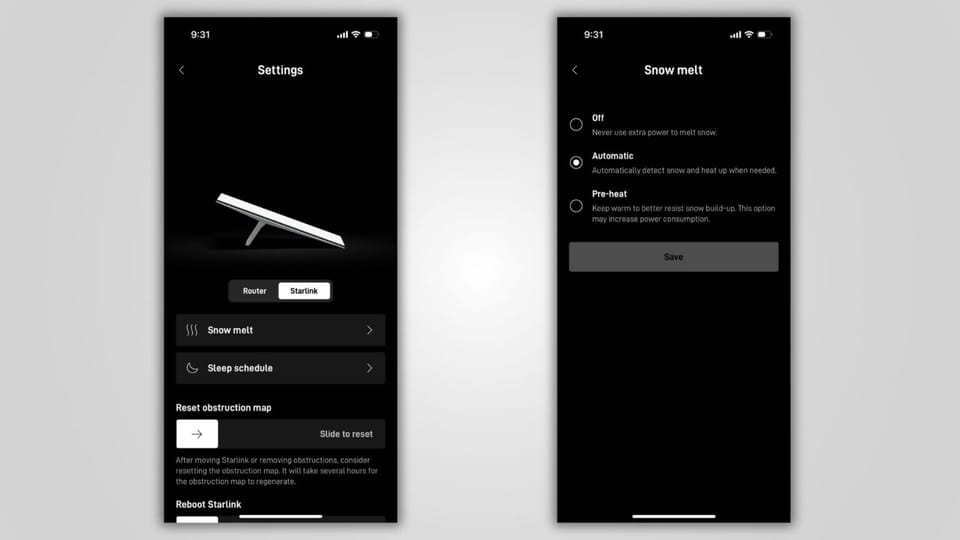
You'll find all the snow melt options in the Starlink app. Open the app and tap "Settings" in the menu. Then tap "Starlink" to open up the settings for the Starlink dish. Select "Snow melt" to adjust how your Starlink handles snow and ice. There are three settings for snow melt:
Off: When snow melt is turned off, your dish won't increase power to melt snow and ice. This is the most power efficient setting, suitable for people in warmer climates.
Automatic: This is the default setting, and what I recommend for most people. When snow melt is set to automatic, the dish can increase power to improve signal quality when rain, snow, or ice impacts the signal to noise ratio (SNR). This mode allows the dish to use more power when necessary, but save power when there is no precipitation.
Pre-heat: This setting is useful for when you know a storm is coming. Pre-heat ramps up power, increasing the surface temperature of the Starlink antenna. With pre-heat turned on, snow is less likely to build up on the dish, even in heavier snowfall.
How Does Snow Melt Work?
Every Starlink model has the ability to melt snow and ice, from the original Gen 1 round dish, to the latest Starlink Mini dish. The difference comes down to the power available with each model. The High Performance dish has a larger power supply, and as a result, is able to melt snow and ice faster than the Standard dish. The Mini has the smallest power supply, and is likely to struggle in heavier snow.
Despite having the ability to melt snow and ice, Starlink dishes don't have a heater built in. The antenna generates heat as a byproduct of its normal operation. It's this heat that increases the temperature on the surface of the dish enough to melt snow and ice.
In automatic snow melt mode, your Starlink dish is constantly keeping an eye on the signal to noise ratio (SNR) of the satellite signal. When the SNR drops too low, the antenna requests more power to compensate. More power to the antenna means more heat.
In other words, your Starlink dish doesn't know that it's snowing. It's actually detecting a lower SNR as a result of the snow in the atmosphere, and it increases power to compensate for the weaker signal. Melting snow and ice is just a nice consequence of the dish maintaining an optimal SNR.
Snow and Ice Buildup on the Dish
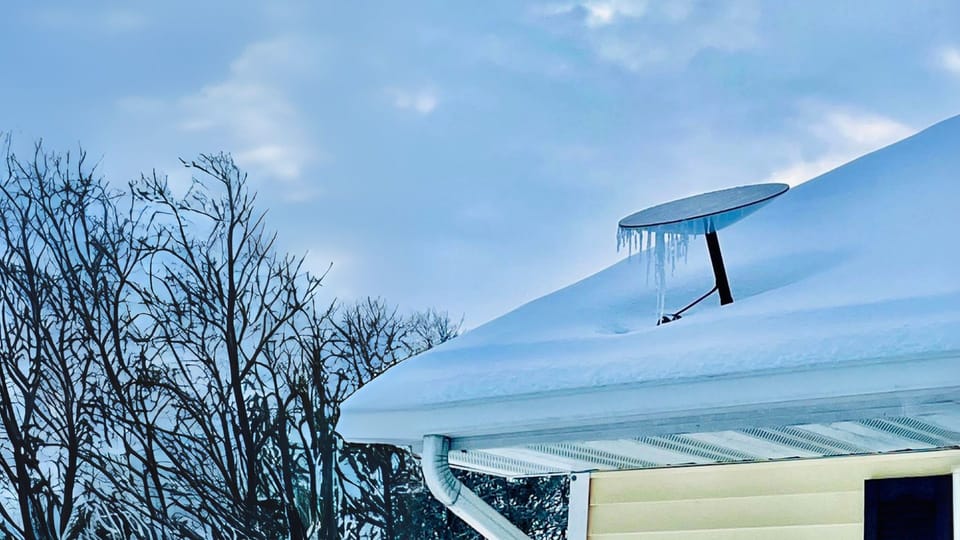
Ice that has melted and formed icicles on the edge of the dish are not a concern. In fact, expect icicles to form if the dish is properly melting snow and ice. You can gently remove the icicles if they start getting large enough to contact the roof.
Snow buildup on the surface of the dish will result in service interruptions. If heat from the dish isn't melting snow fast enough, you may have to manually clear it to restore your connection.
If you have an older actuated Starlink dish, be sure snow isn't building up underneath. The actuated dishes can readjust periodically, so keep the surrounding area clear. Otherwise, you might get the "motors stuck" error message in the Starlink app.
Why Does My Dish Say "Heating" When It's Not Snowing?
In the automatic snow melt mode, you might notice a message in the Starlink app that says your Starlink dish is heating, even when there is no snow or ice. The heating message often pops up when temperatures are lower or it's raining. It's completely normal, and nothing to worry about.
Remember how I said that Starlink can't tell if it's snowing? Starlink will send extra power to the antenna to maintain an ideal SNR. Sometimes clouds, rain, and even colder temperatures can cause the SNR to decrease. Starlink compensates by increasing power to the dish, resulting in the heating message.
Summary
All Starlink models can melt snow and ice automatically. Those of you living in areas that get a lot of snow can adjust the snow melt settings to pre-heat the dish for an incoming storm. RV'ers, off grid users, and those of you in warm climates can turn off snow melt to save power.
For more information on how Starlink handles different kinds of weather, check out my post about how well Starlink works in bad weather.


Discussion
20 Comments