
Restricted Status - What It Means and How To Fix It
Restricted mode only allows you to access the Starlink website to manage your subscription. Here are the common causes and solutions.

- Author
- Published
- Community
- 12 comments
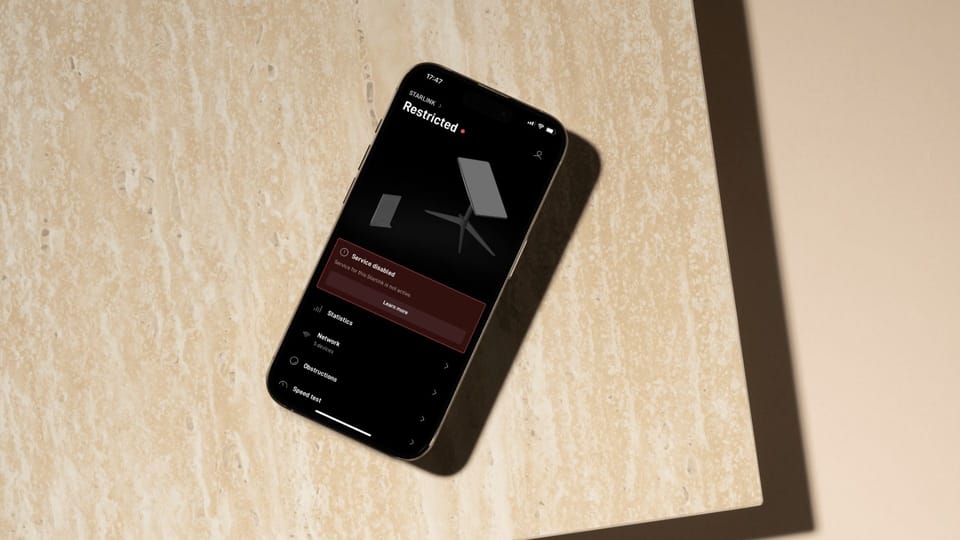
The "Restricted" status in the Starlink app means the dish does not have full internet access. When your connection is restricted, you can only access the Starlink website to manage your account and subscription. To get back online, you'll need to fix the cause of the restriction, which is usually a service plan issue.
I've received a lot of questions about the Restricted status recently, so I thought I would create this troubleshooting guide to help. I'll walk you through the most common causes, offering solutions along the way.
What the Restricted Status Means
When your Starlink app status says Restricted, it means the dish is connected to the Starlink satellites, but access to the internet is restricted. Starlink restricts internet access for several reasons, but it's almost always a subscription issue. For example, if you buy a Starlink kit from a 3rd party retailer and power it on, it will say Restricted until you go through the activation process and sign up for service.
Restricted mode has an important purpose. It allows you to manage your Starlink account and subscription through the dish connection so you can fix the issue and get back online. Starlink is the only internet option for many customers, so it's important to be able to manage the service using the dish, without people having to rely on cell service.
Common Causes and Solutions
Below the Restricted message you should see some additional information related to your specific issue. This is key to troubleshooting the cause of your Restricted status. There are basically six situations where your Starlink internet access would be restricted.
No Active Subscription
Cause: Your dish isn't associated with a Starlink account or active service plan. Either it has never been activated, or has been cancelled/transferred if it was working before.
Solution: If you didn't purchase directly from Starlink, you have to activate the Starlink kit before it can be used. If your dish was working before, service might have been cancelled. Log in to the Starlink app or website to check on your subscription, and make sure your service plan is still active.
Service Paused
Cause: Some Starlink subscriptions, like Roam, can be paused. Your internet access will be restricted while service is paused. You'll only be able to use the Starlink app or access the Starlink website to unpause your subscription.
Solution: Open the Starlink app and tap on the profile icon in the upper right corner. Scroll down and tap Manage Subscription. Slide the toggle to the right to unpause your Roam plan. It might take up to 15 minutes for the Restricted message to go away.
Unexpected Location
Cause: Each Starlink service plan has limitations on where you can use the dish. Residential service can only be used at the service address on the account. Roam service has a 2 month international travel limit.
Solution: If you see the Unexpected Location message, it means you aren't using your Starlink in a supported location. Log on to the Starlink website to check your service plan and service address. For fixed location plans, like Residential, you can only use the dish at the service address. For Roam plans, make sure you are traveling in an approved country, and that you haven't exceeded the 2 month international travel limitation.
Data Usage Limit Reached
Cause: Some service plans have a limited amount of data each month, like Mobile Priority and Roam 50GB. When you no longer have data left for the month, your status will show as Restricted.
Solution: You can opt-in to additional data on the Starlink app or website. Alternatively, you can upgrade your service plan to one with more monthly data. If you choose to opt-in to additional data, you will be charged for every additional GB used while the opt-in is enabled.
Service Inactive
Cause: If you cancelled your subscription, you will see the Service Inactive message.
Solution: You can reactivate your subscription at any time using your restricted access through the Starlink app or website.
Service Disabled
Cause: In some situations, like if you are trying to use Starlink in a country where the service hasn't been approved, you'll see the Service Disabled message. It means the service plan you are on doesn't support access in your current location.
Solution: You might not be able to fix this one. If you are trying to use Starlink in a country where the service isn't authorized, you won't be able to get around the Service Disabled error. Roam and Mobile Priority service plans might temporarily work in unapproved locations, but service can be disabled after 2 months.
Summary
The Restricted status in the Starlink app means there is an issue with your account or service plan. Use your restricted internet access to take a look at your account. It might be as simple as unpausing your Roam plan.
If you've tried my solutions but still can't get online, I recommend contacting Starlink support. Starlink will be able to look at your account in more detail, and figure out what the problem is.
Discussion
12 Comments