
Starlink Beam Switching Upgrade Improves Reliability for Obstructed Dishes
Starlink’s upgraded beam switching technology allows for 99.9% uptime, even for dishes partially obstructed by trees.


A Starlink dish requires a clear view of the sky for optimal performance, but that’s not always practical, especially for homes surrounded by trees. Obstructions like trees and buildings can block the satellite signal, creating a brief interruption until another satellite comes into view.
To improve the performance of partially obstructed dishes, Starlink uses a technology called beam switching. According to an update shared on the Starlink website, beam switching was recently improved. Each dish now has 10s of satellites in view, and automatically switches between them in real time to maintain a stable connection.

Beam switching isn’t new. Starlink satellites move across the sky at 17,000 miles per hour, so the ability for a dish to switch between satellites is critical, even with a perfectly clear view of the sky.
In fact, I made a YouTube video about it more than a year ago. At the time, Starlink was promising big improvements to obstructed performance, and it looks like they’ve delivered.
Although it’s not new, Starlink has recently improved their algorithms, adding a proactive switching mode and reducing reactive switching time.
Starlink’s beam switching works both proactively and reactively. Proactive switching is available when the dish is stationary and has enough time to build an obstruction map, which can take days. As satellites pass overhead and communicate with the dish, a real time obstruction map is generated and displayed in the Starlink app.
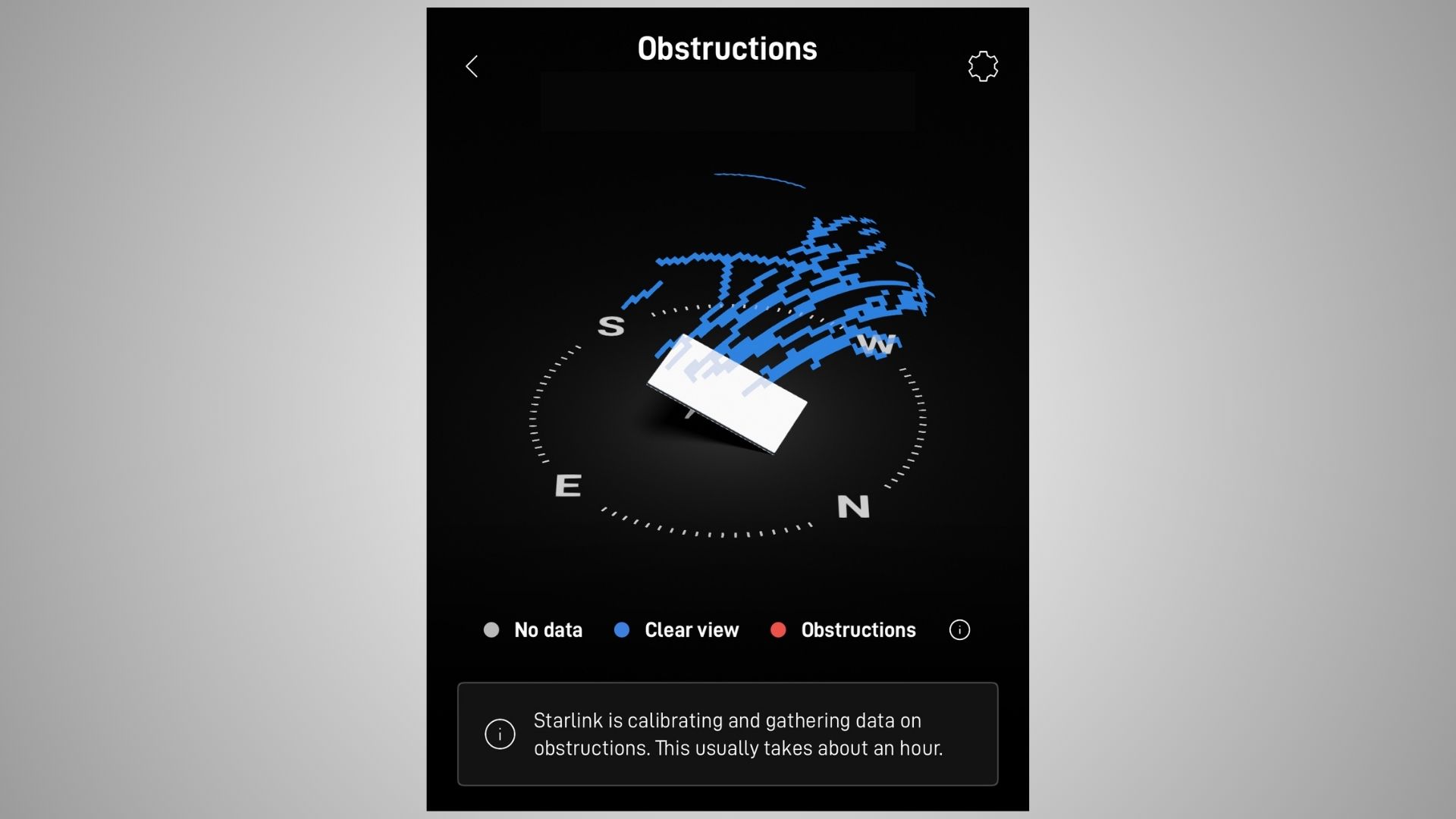
Data from the map helps route the signal around the obstructions using alternate satellites, resulting in a more stable and reliable connection. In other words, the Starlink dish will avoid using satellites it knows will be obstructed.
Reactive beam switching applies when a Starlink dish is mobile or when unexpected obstructions interrupt the satellite signal. A dish that is mounted to a vehicle can’t build an obstruction map because the environment is constantly changing. Although the dish won’t be able to predict where the obstruction areas are, it can quickly switch to other satellites if the signal is ever blocked. Starlink says reactive switching happens in a timescale of tens to hundreds of milliseconds, and that switching can occur multiple times per minute.
Some users are already noticing the effects of the change, with this Reddit comment describing a noticeable improvement in obstructed performance.
“Anecdotally, I do seem to be experiencing fewer+shorter outages. Currently, I’m 14.52% obstructed and my Mini is 63 degrees out of alignment,” the user said. They go on to say, “I’m only getting 2-3 second outages every 10 minutes or so – my past experience in similar locations is 15-30 second outages every 5 minutes.”
Starlink customers don’t need to do anything to take advantage of the recently improved beam switching technology. Every Starlink dish uses it automatically. Installing the dish with a clear view of the sky is still optimal, but in situations where that isn’t possible, even a partially obstructed dish can achieve 99.9% uptime thanks to beam switching.
The Starlink app has tools that help customers make informed decisions about alignment, mounting locations, and obstructions. Before installing the dish, users can run an obstruction scan to see if trees or buildings will cause interruptions. Following the installation, customers can monitor the obstruction map for issues, which show up as red within the dish field of view.

The update by Starlink comes at a time when SpaceX has been launching a lot of Starlink satellites, which only improves beam switching performance.
There are about 8,000 Starlink satellites in orbit, a number that will continue to grow over the coming years. Satellite density is a key factor for beam switching. The more satellites within the view of a dish, the more options it has to deal with obstructions.

Starlink has recently offered a Starlink Mini set for $299 vice $499 . I would plan to use this with my RV camping, while camped, stationary. Do you have an evaluation for this option, addressing idling service during non-use.
We have used a residential system successfully for two years now. Anecdotally, though we have seen numerous “Elevated Packet Loss” notices in the Starlink app Statistics subpage several times per minute since the latest OS update.
Salut les groupes starlink je vous remercie pour votre aide et votre intelligence artificielle et votre connaissance que dieu vous bénisse mes salutations distinguées
Salut mes salutations distinguées je viens au près de pour vous m’aider
thanks for the knowledge.
Why can’t we get direct customer care service from starlink. The internet is perfect, but Incase of an issue you stay for months before it can be resolved due to lack of customer service. It’s quite annoying to just chat with a chatbox that can’t assist
I bought the dish when it was introduced its rather worst decision I ever made. After a year and a half, I have moved onto another Internet subscriber after being frustrated with starlinks useless service. Basically I wasted my hard earned money buying the dish and paying for the useless service every month that never worked…..
What was the problem, obstructions like trees?
StarLink has been the best thing that happened to humanity. I think you should check your installation.
Our dish was previously pointed due north, now it points north west into a large grouping of black spruce trees… The signal is terrible now and frequent drops and intermittent horrible speeds.
In the past month it has been terrible. No idea why it is pointing that way now. I wish we could disable the motors without drilling
My mini dish has a clear view of thesky(no red dots) & positioned correctly & yet I am experiencing annoying interruptions in connectivity. What could be the problem?
If you look in the Starlink app at the Statistics, then Outages page, look at the 2s+ outages. Are you seeing anything listed for the last 12 hours? What are the labeled? If you aren’t seeing the outages there, it’s likely a WiFi signal issue. The Mini has a pretty weak WiFi router, and it being integrated into the dish which is outside poses a problem for devices inside a home.
Félicitation, nous encourageons à cette mise à jour afin de permettre la bonne utilisation des antennes et la perfection de la technologie, nous aimerions avoir des antennes que nous utiliserons de l’intérieur de nos maisons merci, Elon Masque.
I have the original round Dishy, being one of the beta testers when they came out. I have intermittent interuptions due to surrounding trees. I have not noticed an improvement on signal. ? Is the original round dish included in this improvement? Appreciate hearing from you. Thank you.
Yes, Starlink says all dishes use the technology. The Gen 1 dish has a smaller field of view compared to all the other Starlink’s, so that may be contributing. It can’t see as much of the sky, so it may not be able to communicate with some of the available satellites.
Hi Colby, that’s great news.
One area we are looking for an improvement in is that if we turn off the gen-3 router (in ROAM) to save power but do not move the vehicle, it seems to take the same time to reconnect when we turn it on again!! Why cannot it be quick, simply be assuming that we have not moved and trying that direction first?? This would help greatly as the Gen-3 setup seems to use 50W even when nothing is being used. Our inverter is not very efficient, so that wattage is saved too when we turn them both off. Most travellers will have the same serious concerns regarding power use so any benefits will be much appreciated.
All the best,
Thanks for your news,
Jim
The Standard dish does take a bit of time to get connected. One thing you could try is sleep mode. It goes from 50W to around 25-30W, and should quicker to wake up compared to having to fully power back up. You can set a schedule in the app so that this takes place automatically. Another idea is switching to a DC power supply instead of using your inverter. This could save 10% or so, depending on how inefficient your inverter is. Finally, if power is a top concern, consider switching to a Mini. It uses 20-25W, so half of what the Standard uses.
Colby,
Thanks for this bit of really good news…!
I was getting a bit discouraged, as I would really like to take of advantage of what StarLink has to offer, however, was a bit stymied by 16.5% obstructed situation…
This looks like a game changer for me…I think I am going to “take the plunge”…
thank-you for your “technical acumen” on this subject…
jo’c
Is still a northern exposure preferable?
Yes, at least where I am in the US.
Beam switching, is it available in my area? Will it really improve the overall performance of Starlink?
Can we try it out before signing up for full service?
It’s available and currently working everywhere. Every Starlink dish uses it automatically. It will definitely improve the performance of your dish in regards to handling trees and obstructions, but it doesn’t mean every mounting location will be without issues. Significant obstructions will still cause interruptions if a lot of the field of view is blocked.
You can’t really try out beam switching, but Starlink does offer a 30 day money back guarantee if it doesn’t work out. You can also use the Starlink app to scan the sky at your location, and Starlink will estimate obstructions.
Hey Colby am Godfrey pls send me a text in my private email something I wanna know in detail
WhatsApp+256783312834